The new Mediatek (MTK) devices running on Android 5 (Lollipop) have proven difficult for our favorite One-Click Root apps to successfully root. Pending when these apps will be updated with the necessary exploits to do the job, Team Hovatek has been busy providing an alternative method; TWRP and CWM.
How do I root my MTK Android 5 (Lollipop) phone using TWRP or CWM recovery?
The procedure is the same for all the phone models listed below (and other Lollipop MTK phones not listed), the recovery image used is just what varies.
Note:
- If your phone model is not listed below and you would like us to port a custom recovery for your phone then drop your request as a comment below
- Only flash a custom recovery ported for your exact phone model
Procedure
- Download the TWRP / CWM recovery image for your exact phone model from the list at the end of this guide (unzip after downloading)
- Download SuperSU.zip @ https://hovatek.com/redirect.php?link=https://docs.google.com/uc?id=0B9srKhKuVIMna0xCdXlLS2dIYUU&export=download and copy it to both the SD card and Phone storage of the phone you wish to root
- Install Mediatek VCOM drivers on your PC using the guide at https://www.hovatek.com/forum/thread-440.html
- Flash the TWRP / CWM recovery image to the phone using the SP flash tool guide at https://www.hovatek.com/forum/thread-159.html
- Boot the phone into recovery mode using the Volume up + Power button (see https://www.hovatek.com/forum/thread-479.html)
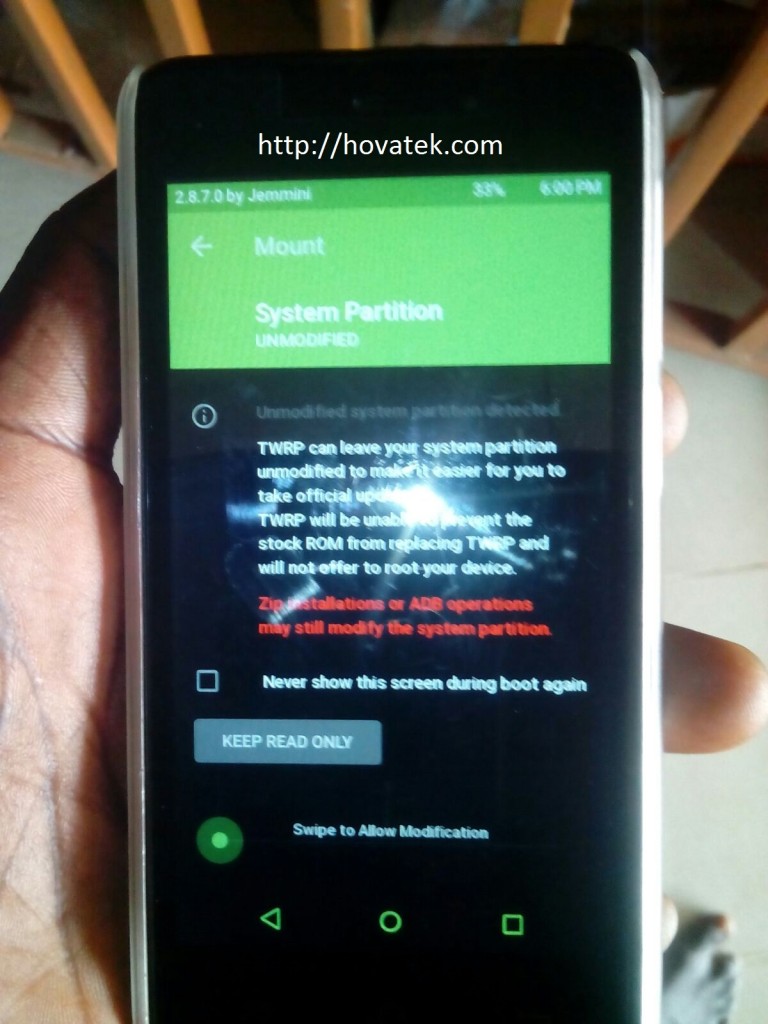
- If you get a message (in TWRP) like in the image below then swipe to allow TWRP modify the system partition
- To swipe, place your finger on the green circle then slide to the right
- In TWRP / CWM recovery, tap Install
- Navigate to the location of the SuperSU zip file you downloaded and select it
- Swipe or Select Yes to confirm flashing
- Reboot the phone once flashing is complete
- Install Root Checker to verify that the phone is rooted
List of TWRP / CWM recovery images for Lollipop Mediatek phones ported by Team Hovatek
* If your phone is not listed then request by posting a comment below
- CWM for Cubot P11: https://hovatek.com/redirect.php?link=https://docs.google.com/uc?id=0B9srKhKuVIMncms4djg1WHJLaWQ0S003MkVGbnQydmdld2tv&export=download
- CWM for Gionee Elife S Plus: https://hovatek.com/redirect.php?link=https://docs.google.com/uc?id=0B9srKhKuVIMnOEZ2cW03Y01XeURxSG1HNmc0NDQwdnNFMWI0&export=download
- CWM for Gionee Pioneer P5W: https://hovatek.com/redirect.php?link=https://docs.google.com/uc?id=0B9srKhKuVIMnVDFSVENxUkdYdEh6OGJaQmE0eG1ySGR5dDRZ&export=download
- TWRP for Innjoo Max 2 3G: https://hovatek.com/redirect.php?link=https://docs.google.com/uc?id=0B9srKhKuVIMnQnc4VlRyWTVSXzA&export=download
- TWRP for Innjoo Max 2 Plus 3G: https://hovatek.com/redirect.php?link=https://docs.google.com/uc?id=0B9srKhKuVIMnTHJCYlVXWTFrR1k&export=download
- TWRP for Old Tecno C8: https://hovatek.com/redirect.php?link=https://docs.google.com/uc?id=0B9srKhKuVIMncDRvUXFRNUN4YkR3cDFwVXdnZTBYYXVBYWJv&export=download
- TWRP for New Tecno C8: https://hovatek.com/redirect.php?link=https://docs.google.com/uc?id=0B9srKhKuVIMnRnBBYUdSRVVVZjg&export=download
- TWRP for Tecno J5: https://hovatek.com/redirect.php?link=https://docs.google.com/uc?id=0B9srKhKuVIMnUVNoeklxVmotTzc4czlja1lPVDZSNDlsQUpn&export=download
- TWRP for Tecno J8: https://hovatek.com/redirect.php?link=https://docs.google.com/uc?id=0B_-waNKLvNRcbUdEMkJKZkRGVkk&export=download
- TWRP for Tecno C5: https://hovatek.com/redirect.php?link=https://docs.google.com/uc?id=0B9srKhKuVIMnWXJpUTNNNnJnZDQ&export=download
- TWRP for Tecno L5: https://hovatek.com/redirect.php?link=https://docs.google.com/uc?id=0B9srKhKuVIMnTEp2Q0RZTkU4T1k&export=download
- TWRP for Tecno Phantom 5: https://hovatek.com/redirect.php?link=https://docs.google.com/uc?id=0B9srKhKuVIMnNV84WlRoSHd0ZkU&export=download
- TWRP for Infinix Note 2 X600: https://hovatek.com/redirect.php?link=https://docs.google.com/uc?id=0B9srKhKuVIMnVnVFdVZaQ3ZXbXRxaUNZRW1Pa3M4OFdiUnRF&export=download
- TWRP for Gionee P2M / M2 Mini: https://hovatek.com/redirect.php?link=https://docs.google.com/uc?id=0B9srKhKuVIMnTFlZRVF6UmNDek0&export=download
- TWRP for Gionee M5: https://hovatek.com/redirect.php?link=https://docs.google.com/uc?id=0B9srKhKuVIMnWmE2dW1rTFY3LXRUUlVRVUEyZWtXaUVjSlo4&export=download
- TWRP for Gionee M3 Mini: https://hovatek.com/redirect.php?link=https://docs.google.com/uc?id=0B9srKhKuVIMnTnZVMExfX3BkMVZ5clJKYlZSTlhTMTV0NVJv&export=download
Hovatek….just a button away!
Mr havotek, i could not find the stock rom and recovery.img of my phone online, wiko lenny 3….
So what do we do?
Do you have a PC?
Hovatek… I must say great job you all are doing to make us enjoy the world of technology.
Please i need TWRP/CWM for
WKIO LENNY 3
Android 6.0
MTK6580
And how to get it rooted… Thanks
Do you have the stock recovery.img and scatter file
No mr havotek…. How do i get it
Please……..
Search for and download the stock rom
If i am able to get the stock rom, what should i do with it…??
upload the scatter file and stock recovery.img
Hi, I’d like to install T.W.R.P.
Please let me know the direction.
My device is Teclast P80h version D4C6
MT8163, lollipop 5.1
Thank you.
do you have the stock recovery and scatter file?
I don’t have both of stock recovery and scatter file.
we cant port a custom recovery without those
https://mega.nz/#!CYxylAza
Please find above link which is included both stock recovery and scatter file.
thanks
Decryption key?
https://mega.nz/#!CYxylAza!HB9R_WTAgT-lGQfeo4hTlM8fbhIir4WKEUUDv8Fc8AA
sorry, above is key with link
Hello,
where you able to root your device? I am looking to do the same, thanks
Awesome post.
Teclast P80h Tablet Version D4C4
It has the MTK MT8163 and Android 5.1
thank you!
boot.img and recovery.img :
http://pan.baidu.com/s/1dDrzCS5
Is a scatter file included?
Yes
Ok. Let’s have your WhatsApp number
Hello, This is the full firmware. please, upload just boot.img, recovery.img and scatter file
How to root?
Try the latest version of Kingroot
Hello I would love to have twrp or cwm recovery for Wiko Highway Star 4G (Android 5.1 / MT6752).
I already have root (Kingroot) but all Recovery guides I tried are not working.
Thanks in advance
Do you have the stock recovery.img?
Yes I have:
https://www.dropbox.com/s/2voyfybtmv85y5o/recovery.img?dl=0
Send this to support@hovatek.com
Hi Hovatek! I have a MLS IqTab Marine tablet which is the same as Teclast p80h i think.. with a MTK MT8163 and Android 5.1. Could you please help me on how to root this device?
Have you tried Kingroot 4.8.0
Yes and it fails every time at 36%
Might be your internet. Another approach is flashing supersu.zip via a custom recovery
Thank you for replying! My internet connection is fine. How can i flash supersu.zip and where can i find a custom recovery for my device?
The download link to SuperSU.zip is in the post above
My device is not listed on the CWM nor the TWRP websites
what’s the phone model?
Its a MLS IqTab Marine (iQ1804_5) tablet
Do you have the recovery.img and scatter file?
I have tried everything i could find actually but nothing worked. If you have any idea of what i could do to root my device i would really appreciate it
Ensure you have a strong internet connection
Hi everyone, I have problems rooting my tecno c5. I followed every steps but when I finished flashing the TWRP recovery and tried to boot in the recovery mode, it showed some kind of Chinese recovery. So I am asking myself why I can’t boot the TWRP recovery I just flashed.
Please help me.
Recovery mode is Volume up + Power, not Volume down + Power
I tried them both, none of these combination is giving me access to TWRP menu. VOLUME_DOWN + power is giving me access to a recovery menu in Chinese language (seems like stock recovery) and VOLUME_UP + Power shows an android logo with no navigable menu. One thing is sure none of them is the TWRP recovery menu.
Anything else I can do?
flash the TWRP recovery image twice before attempting to boot into recovery mode
I already tried that. I flashed twice and booted into recovery I still got the stock recovery, I even tried flashing it three times… I’m just wondering what is different with that phone. I’m using android 5.0.2 could this be the reason??
lets have your Whatsapp number
Here is my whatsapp number +223*****Edited
Ok.
So glad I am. Successfully got my tecno c5 rooted with the new KingRoot app. Installed the TWRP custom recovery ported by team hovatek and finally successfully flashed xposed framework through TWRP recovery. Thank you for your support and your time.
Glad to know
I’ve used rashr too, it’s still the same. I also tried flashing cwm recovery with MTK Droid tools, I still can’t get custom recovery. Maybe I should also try flashify as suggested. Thnks for the attention.
Ok
Pls do you know how I can flash xposed framework to the phone. I want to work on improving the status bar.
We’ll drop a guide on that soon
OK. Thank you. I will check back later.
Ok
The twrp recovery isn’t coming on whenever I boot into recovery of my InnJoo max 2 plus. I’ve successfully flashed the recovery as instructed in the above procedure, but still bringing the original recovery mode of the phone whenever I boot into recovery. Pls help.
Flash the twrp recovery.img twice before trying to boot into recovery mode
Well, I tried that just now, still the same issue.
Try using Kingroot 2.4.8
Yes, I’ve already rooted the phone with kingroot, but I still need the custom recovery. Has the twrp recovery worked for any other max 2 plus user?
Yes, that’s how we were able to root it.
Try using rashr or flashify