The new Mediatek (MTK) devices running on Android 5 (Lollipop) have proven difficult for our favorite One-Click Root apps to successfully root. Pending when these apps will be updated with the necessary exploits to do the job, Team Hovatek has been busy providing an alternative method; TWRP and CWM.
How do I root my MTK Android 5 (Lollipop) phone using TWRP or CWM recovery?
The procedure is the same for all the phone models listed below (and other Lollipop MTK phones not listed), the recovery image used is just what varies.
Note:
- If your phone model is not listed below and you would like us to port a custom recovery for your phone then drop your request as a comment below
- Only flash a custom recovery ported for your exact phone model
Procedure
- Download the TWRP / CWM recovery image for your exact phone model from the list at the end of this guide (unzip after downloading)
- Download SuperSU.zip @ https://hovatek.com/redirect.php?link=https://docs.google.com/uc?id=0B9srKhKuVIMna0xCdXlLS2dIYUU&export=download and copy it to both the SD card and Phone storage of the phone you wish to root
- Install Mediatek VCOM drivers on your PC using the guide at https://www.hovatek.com/forum/thread-440.html
- Flash the TWRP / CWM recovery image to the phone using the SP flash tool guide at https://www.hovatek.com/forum/thread-159.html
- Boot the phone into recovery mode using the Volume up + Power button (see https://www.hovatek.com/forum/thread-479.html)
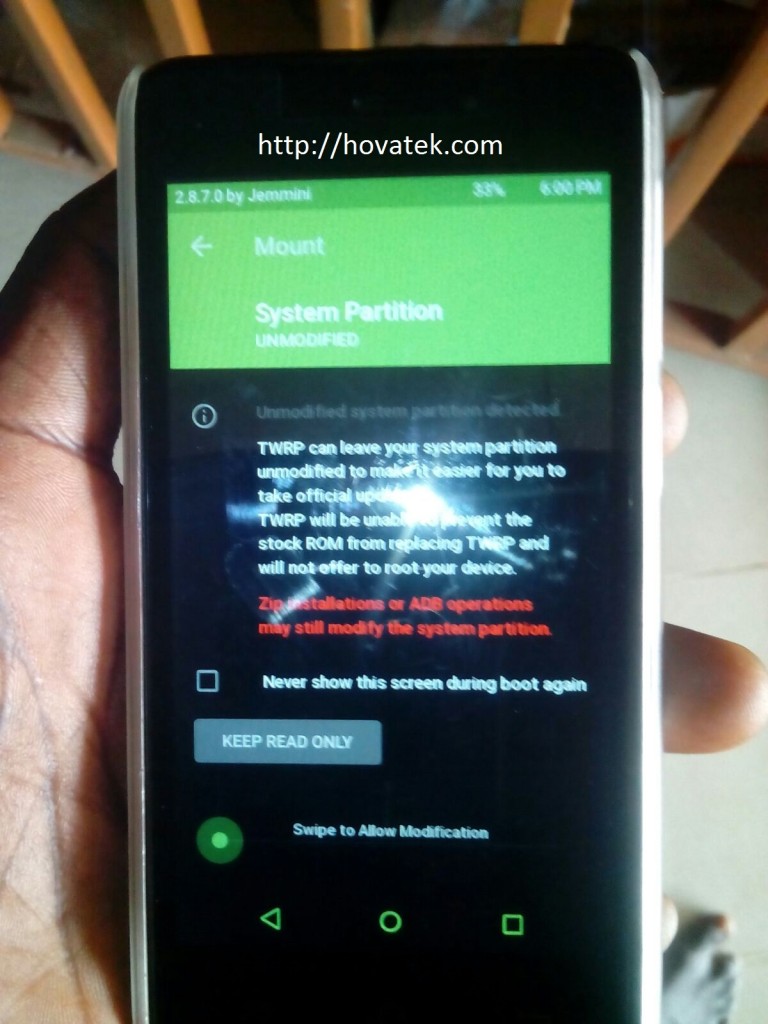
- If you get a message (in TWRP) like in the image below then swipe to allow TWRP modify the system partition
- To swipe, place your finger on the green circle then slide to the right
- In TWRP / CWM recovery, tap Install
- Navigate to the location of the SuperSU zip file you downloaded and select it
- Swipe or Select Yes to confirm flashing
- Reboot the phone once flashing is complete
- Install Root Checker to verify that the phone is rooted
List of TWRP / CWM recovery images for Lollipop Mediatek phones ported by Team Hovatek
* If your phone is not listed then request by posting a comment below
- CWM for Cubot P11: https://hovatek.com/redirect.php?link=https://docs.google.com/uc?id=0B9srKhKuVIMncms4djg1WHJLaWQ0S003MkVGbnQydmdld2tv&export=download
- CWM for Gionee Elife S Plus: https://hovatek.com/redirect.php?link=https://docs.google.com/uc?id=0B9srKhKuVIMnOEZ2cW03Y01XeURxSG1HNmc0NDQwdnNFMWI0&export=download
- CWM for Gionee Pioneer P5W: https://hovatek.com/redirect.php?link=https://docs.google.com/uc?id=0B9srKhKuVIMnVDFSVENxUkdYdEh6OGJaQmE0eG1ySGR5dDRZ&export=download
- TWRP for Innjoo Max 2 3G: https://hovatek.com/redirect.php?link=https://docs.google.com/uc?id=0B9srKhKuVIMnQnc4VlRyWTVSXzA&export=download
- TWRP for Innjoo Max 2 Plus 3G: https://hovatek.com/redirect.php?link=https://docs.google.com/uc?id=0B9srKhKuVIMnTHJCYlVXWTFrR1k&export=download
- TWRP for Old Tecno C8: https://hovatek.com/redirect.php?link=https://docs.google.com/uc?id=0B9srKhKuVIMncDRvUXFRNUN4YkR3cDFwVXdnZTBYYXVBYWJv&export=download
- TWRP for New Tecno C8: https://hovatek.com/redirect.php?link=https://docs.google.com/uc?id=0B9srKhKuVIMnRnBBYUdSRVVVZjg&export=download
- TWRP for Tecno J5: https://hovatek.com/redirect.php?link=https://docs.google.com/uc?id=0B9srKhKuVIMnUVNoeklxVmotTzc4czlja1lPVDZSNDlsQUpn&export=download
- TWRP for Tecno J8: https://hovatek.com/redirect.php?link=https://docs.google.com/uc?id=0B_-waNKLvNRcbUdEMkJKZkRGVkk&export=download
- TWRP for Tecno C5: https://hovatek.com/redirect.php?link=https://docs.google.com/uc?id=0B9srKhKuVIMnWXJpUTNNNnJnZDQ&export=download
- TWRP for Tecno L5: https://hovatek.com/redirect.php?link=https://docs.google.com/uc?id=0B9srKhKuVIMnTEp2Q0RZTkU4T1k&export=download
- TWRP for Tecno Phantom 5: https://hovatek.com/redirect.php?link=https://docs.google.com/uc?id=0B9srKhKuVIMnNV84WlRoSHd0ZkU&export=download
- TWRP for Infinix Note 2 X600: https://hovatek.com/redirect.php?link=https://docs.google.com/uc?id=0B9srKhKuVIMnVnVFdVZaQ3ZXbXRxaUNZRW1Pa3M4OFdiUnRF&export=download
- TWRP for Gionee P2M / M2 Mini: https://hovatek.com/redirect.php?link=https://docs.google.com/uc?id=0B9srKhKuVIMnTFlZRVF6UmNDek0&export=download
- TWRP for Gionee M5: https://hovatek.com/redirect.php?link=https://docs.google.com/uc?id=0B9srKhKuVIMnWmE2dW1rTFY3LXRUUlVRVUEyZWtXaUVjSlo4&export=download
- TWRP for Gionee M3 Mini: https://hovatek.com/redirect.php?link=https://docs.google.com/uc?id=0B9srKhKuVIMnTnZVMExfX3BkMVZ5clJKYlZSTlhTMTV0NVJv&export=download
Hovatek….just a button away!
Gionee elife s7???
Do you have the boot.img, recovery.img and scatter file?
Please I need stockroom for nummy note 7
Request at https://forum.hovatek.com/thread-9678.html
Hello hovatek
Please I need TWRP for Teclast P80h Tablet Version D4C4
It has the MTK MT8163 and Android 5.1
Have you sent us the recovery.img, boot.img and scatter file?
Please look at the Reply from Vladimir:
Yes I have, this is a link https://www.dropbox.com/sh/pi57irj57mm74p7/AADV13ghgP6KKNo54IFlkBT_a?dl=0
It’s the same…
Ok. We’re currently working on your type of recovery image. It’s the same type as Gionee S7.
Let’s have your whatsapp number
Pls i need CWM or TWRP for infinix zero x506 (16+2)
Please, post this at the Hovatek forum
Twrp recovery image for Innjoo max 2 3G is needed.
What’s your whatsapp number?
I have downloaded tecno camon c8 stock rom variant 2 and also use sp flash tool to flash it and also flash twrp but yet I can’t access the twrp mode to install supersu zip file, whenever I flash the twrp and want to boot to custom recovery using volume up button and power it will just power on the phone, please help great team, I can’t access my stock recovery neither custom recovery . Please help. My number on what’s app 08026700152.
We’re you able to flash Tecno C8 variant 2 firmware without any problem?
Yes sir, it flashed very well and it’s working perfectly. But still can’t go into twrp, always booting normal after I flash twrp
Ok. Install the OTA to revert to C8-H352-A2-L-20160118
Let me know once done
I have already Installed the OTA, am still thesame person on the upper chat With same subject, I have a PC And the latest version of sp flash tool I downloaded from your site. Please guilde me on the next step.
A rep will contact you via whatsapp
OTA is installed already. I have also tried flashing variant 2 twrp after that but still can’t get access to custom recovery.
Ok. Use the scatter file to readback recovery.img using the guide @ https://forum.hovatek.com/thread-526.html
After the read back recovery. Img what next sir?
Send it with the scatter file to support@hovatek.com
Mtk droid tool not recognizing my device, but I have installed mediatek drivers using pda +net,I believe my blog drivers is automatically installed since it’s a working phone, how can I remedy this?
You dont need mtk droid tools.
You’ll get the blocksmap info from the scatter file.
Open the scatter file using notepad++ and locate the recovery part. You’ll use physical_start_address for start and partition_size for length. At the guide, you’re to use method A which is for readback of a single file
Hello hovatek
Please I need TWRP for Teclast P80h Tablet Version D4C4
It has the MTK MT8163 and Android 5.1
We would gladly help port a custom recovery. Do you have the scatter file, boot.img and recovery.img from the phone’s firmware?
Yes I have, this is a link https://www.dropbox.com/sh/pi57irj57mm74p7/AADV13ghgP6KKNo54IFlkBT_a?dl=0
Let’s have your whatsapp number
Here is my whatsapp number +79062363746
We’ll contact you via whatsapp
Hello,
I am also urgently looking for this. Is it currently available for this model? (Teclast p80h)
That should be at the forum
May I know where? Can’t really see it.
What exactly are you looking for?
Pls I need a cwm for snokor z5000.sc7731/8830 android 5.1 version
This post is for Mediatek, not Spreadtrum.
Drop your whatsapp number so we contact you once we port it.
My phone TWRP was not listed. Am using Gionee p5w . Thanks
We’ve ported CWM for you and will list it soon.
Let’s have your whatsapp number
Here is my what’s app number +2348106412942
A Hovatek rep will contact you
I followed the steps but when I want to boot to twrp mode using vol up+power button it keeps taking me back to tecno boot logo, am using camon c8, please assist. Thanks 08036200282
Which of the Tecno C8 TWRP recovery images did you flash?
I flashed both new and old twrp, variant 1 and 2, all to no avail, please assist as am so frustrated with inability to root my tecno camon c8.
What’s the build number if your phone?
C8-H352-A2-L-20160118.
Ok. We’ll work on this build.
Do you have a pc and sp flash tool?
Yes I have a PC And the latest sp flash tool I downloaded from your site.
What’s the present build number of the phone?
Still same because I already installed OTA and flashed twrp before chatting you but yet no way out. Please help
We need you to extract the recovery.img for your build