The new Mediatek (MTK) devices running on Android 5 (Lollipop) have proven difficult for our favorite One-Click Root apps to successfully root. Pending when these apps will be updated with the necessary exploits to do the job, Team Hovatek has been busy providing an alternative method; TWRP and CWM.
How do I root my MTK Android 5 (Lollipop) phone using TWRP or CWM recovery?
The procedure is the same for all the phone models listed below (and other Lollipop MTK phones not listed), the recovery image used is just what varies.
Note:
- If your phone model is not listed below and you would like us to port a custom recovery for your phone then drop your request as a comment below
- Only flash a custom recovery ported for your exact phone model
Procedure
- Download the TWRP / CWM recovery image for your exact phone model from the list at the end of this guide (unzip after downloading)
- Download SuperSU.zip @ https://hovatek.com/redirect.php?link=https://docs.google.com/uc?id=0B9srKhKuVIMna0xCdXlLS2dIYUU&export=download and copy it to both the SD card and Phone storage of the phone you wish to root
- Install Mediatek VCOM drivers on your PC using the guide at https://www.hovatek.com/forum/thread-440.html
- Flash the TWRP / CWM recovery image to the phone using the SP flash tool guide at https://www.hovatek.com/forum/thread-159.html
- Boot the phone into recovery mode using the Volume up + Power button (see https://www.hovatek.com/forum/thread-479.html)
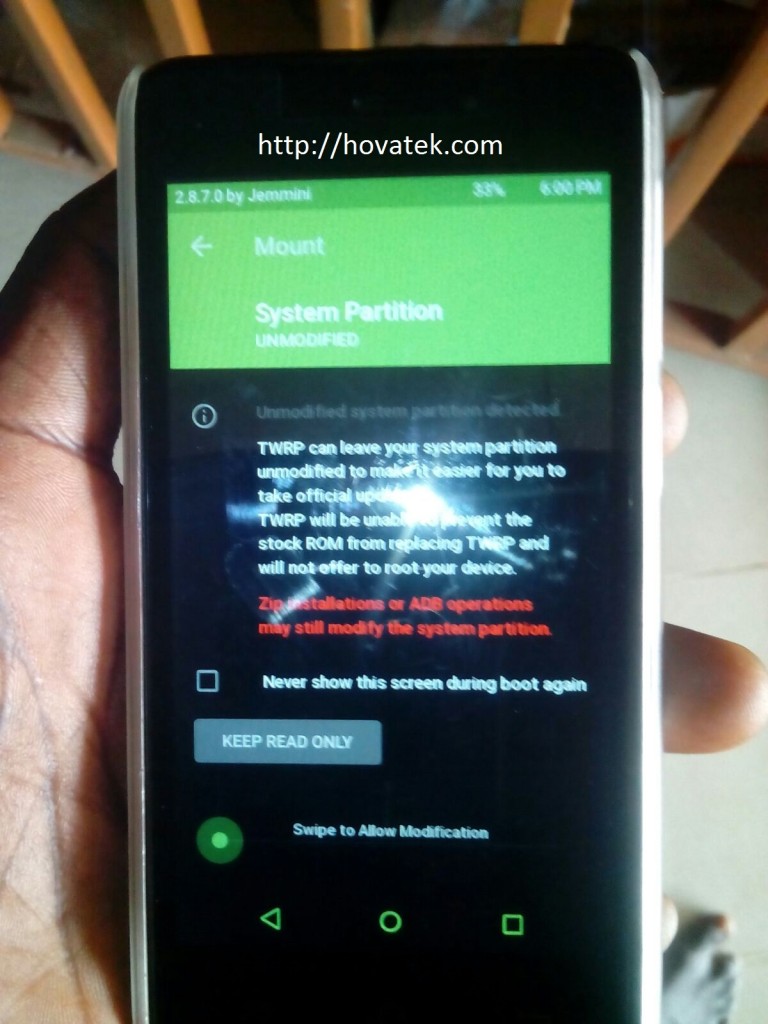
- If you get a message (in TWRP) like in the image below then swipe to allow TWRP modify the system partition
- To swipe, place your finger on the green circle then slide to the right
- In TWRP / CWM recovery, tap Install
- Navigate to the location of the SuperSU zip file you downloaded and select it
- Swipe or Select Yes to confirm flashing
- Reboot the phone once flashing is complete
- Install Root Checker to verify that the phone is rooted
List of TWRP / CWM recovery images for Lollipop Mediatek phones ported by Team Hovatek
* If your phone is not listed then request by posting a comment below
- CWM for Cubot P11: https://hovatek.com/redirect.php?link=https://docs.google.com/uc?id=0B9srKhKuVIMncms4djg1WHJLaWQ0S003MkVGbnQydmdld2tv&export=download
- CWM for Gionee Elife S Plus: https://hovatek.com/redirect.php?link=https://docs.google.com/uc?id=0B9srKhKuVIMnOEZ2cW03Y01XeURxSG1HNmc0NDQwdnNFMWI0&export=download
- CWM for Gionee Pioneer P5W: https://hovatek.com/redirect.php?link=https://docs.google.com/uc?id=0B9srKhKuVIMnVDFSVENxUkdYdEh6OGJaQmE0eG1ySGR5dDRZ&export=download
- TWRP for Innjoo Max 2 3G: https://hovatek.com/redirect.php?link=https://docs.google.com/uc?id=0B9srKhKuVIMnQnc4VlRyWTVSXzA&export=download
- TWRP for Innjoo Max 2 Plus 3G: https://hovatek.com/redirect.php?link=https://docs.google.com/uc?id=0B9srKhKuVIMnTHJCYlVXWTFrR1k&export=download
- TWRP for Old Tecno C8: https://hovatek.com/redirect.php?link=https://docs.google.com/uc?id=0B9srKhKuVIMncDRvUXFRNUN4YkR3cDFwVXdnZTBYYXVBYWJv&export=download
- TWRP for New Tecno C8: https://hovatek.com/redirect.php?link=https://docs.google.com/uc?id=0B9srKhKuVIMnRnBBYUdSRVVVZjg&export=download
- TWRP for Tecno J5: https://hovatek.com/redirect.php?link=https://docs.google.com/uc?id=0B9srKhKuVIMnUVNoeklxVmotTzc4czlja1lPVDZSNDlsQUpn&export=download
- TWRP for Tecno J8: https://hovatek.com/redirect.php?link=https://docs.google.com/uc?id=0B_-waNKLvNRcbUdEMkJKZkRGVkk&export=download
- TWRP for Tecno C5: https://hovatek.com/redirect.php?link=https://docs.google.com/uc?id=0B9srKhKuVIMnWXJpUTNNNnJnZDQ&export=download
- TWRP for Tecno L5: https://hovatek.com/redirect.php?link=https://docs.google.com/uc?id=0B9srKhKuVIMnTEp2Q0RZTkU4T1k&export=download
- TWRP for Tecno Phantom 5: https://hovatek.com/redirect.php?link=https://docs.google.com/uc?id=0B9srKhKuVIMnNV84WlRoSHd0ZkU&export=download
- TWRP for Infinix Note 2 X600: https://hovatek.com/redirect.php?link=https://docs.google.com/uc?id=0B9srKhKuVIMnVnVFdVZaQ3ZXbXRxaUNZRW1Pa3M4OFdiUnRF&export=download
- TWRP for Gionee P2M / M2 Mini: https://hovatek.com/redirect.php?link=https://docs.google.com/uc?id=0B9srKhKuVIMnTFlZRVF6UmNDek0&export=download
- TWRP for Gionee M5: https://hovatek.com/redirect.php?link=https://docs.google.com/uc?id=0B9srKhKuVIMnWmE2dW1rTFY3LXRUUlVRVUEyZWtXaUVjSlo4&export=download
- TWRP for Gionee M3 Mini: https://hovatek.com/redirect.php?link=https://docs.google.com/uc?id=0B9srKhKuVIMnTnZVMExfX3BkMVZ5clJKYlZSTlhTMTV0NVJv&export=download
Hovatek….just a button away!
Hey , can you create a custom recovery either cwm or twrp for my Winds V6. I have the stock recovery.img .
My whatsapp : +60174843523
Please, create a new thread at our forum and our forums reps will provide free step by step assistance
see https://forum.hovatek.com/thread-514.html for how to create a thread
Has there now already been anybody to test ist forTeclast p80h?
My device is Teclast P80h
MT8163, lollipop 5.1
twrp for huawei y541-u02
DO you have the stock recovery and scatter file?
twrp for huawei y541-u02
Please I need a custom recovery for Intex Cloud Tread (5.1)
Tried with the auto CWM in MTK Droid Tools, but it just wouldn’t load.
I will send you the necessary *.img files and scatter text. Tried everything, this thing just won’t let me root it.
We’ll be happy to help.
Please, create a new thread at our forum and our forums reps will provide free step by step assistance
see https://forum.hovatek.com/thread-514.html for how to create a thread
please i need root file for this sony v10 copy it runs version 5, this the builder number a831_324_ax_cht_v10_welcome_v1.3_20160317154402
Do you have the stock recovery.img?
Dear friend Hovatek,
After a MILLION efforts, I have managed to ROOT this MLS iQTab Joy, that was SO stubborn to rooting!!! Can you please help me UNLOCK its Bootloader (IF needed!!!), and create a CWM or TWRP Recovery for it?
It has Ubifs and I can NOT pull the Stock Recovery in .img format somehow, unless ADB or Terminal Emulator can do that!!! Flashify failed, Rashr failed, FlashFire failed, and so on…. Easy TWRP Magic Creator, managed to produce a TWRP .img file, for me to flash, but I just can’t flash it, somehow!!! And that’s ignoring the fact that I am a little bit scared, since I do NOT have a valid copy of the STOCK Recovery!!!! Please help me!!!!
Is the root for Teclast p80h available? I have seen some comments above with people asking for it.
My device is Teclast P80h version D4C6
MT8163, lollipop 5.1
we’ve not had someone to test.
Tablet acer iconia A3 A40 MT8163 android 6. TWRP – ROOT
Do you have the stock recovery.img and scatter file?
Rom. http://www.acer.com/ac/cs/CZ/content/drivers
Scatter You can not do
Please Hovatek, help me! I need a Custom Recovery (TWRP or even CWM) for my MLS iQTab Joy (IQ1804_5) Tablet that runs Android 5.1.1 and which is UN-rootable by Kingroot, KingoRoot, iRoot, SRSRoot, TowelRoot, Framaroot, Universalandroot, Root Genius, Cydia Impactor, BaiduRoot, OneClickRoot and many more! As I have NO Root Access, and the StockROM is nowhere to be found, I can’t provide you with a valid MT8163_Android_scatter.txt file for my device. Even the latest version of MTK Droid Tools does NOT work, despite I have all the needed drivers installed! I have a fast Internet Connection by the way! If you manage to provide me a working custom recovery (TWRP or CWM), soon, I promise to donate money to you! REALLY! Only condition is, that Custom Recovery has to be able to work flawlessly on my device, in order to enable me to flash through it, the SuperSU (to gain Root Access). Thanks a million, in advance & please help me!
Please port twrp recovery for my Intex aqua ace 2 with Intex_Aqua_Ace_2_V07_Indian_SER. If you want the recovery image, I can send you. Thank you in anticipation.