The new Mediatek (MTK) devices running on Android 5 (Lollipop) have proven difficult for our favorite One-Click Root apps to successfully root. Pending when these apps will be updated with the necessary exploits to do the job, Team Hovatek has been busy providing an alternative method; TWRP and CWM.
How do I root my MTK Android 5 (Lollipop) phone using TWRP or CWM recovery?
The procedure is the same for all the phone models listed below (and other Lollipop MTK phones not listed), the recovery image used is just what varies.
Note:
- If your phone model is not listed below and you would like us to port a custom recovery for your phone then drop your request as a comment below
- Only flash a custom recovery ported for your exact phone model
Procedure
- Download the TWRP / CWM recovery image for your exact phone model from the list at the end of this guide (unzip after downloading)
- Download SuperSU.zip @ https://hovatek.com/redirect.php?link=https://docs.google.com/uc?id=0B9srKhKuVIMna0xCdXlLS2dIYUU&export=download and copy it to both the SD card and Phone storage of the phone you wish to root
- Install Mediatek VCOM drivers on your PC using the guide at https://www.hovatek.com/forum/thread-440.html
- Flash the TWRP / CWM recovery image to the phone using the SP flash tool guide at https://www.hovatek.com/forum/thread-159.html
- Boot the phone into recovery mode using the Volume up + Power button (see https://www.hovatek.com/forum/thread-479.html)
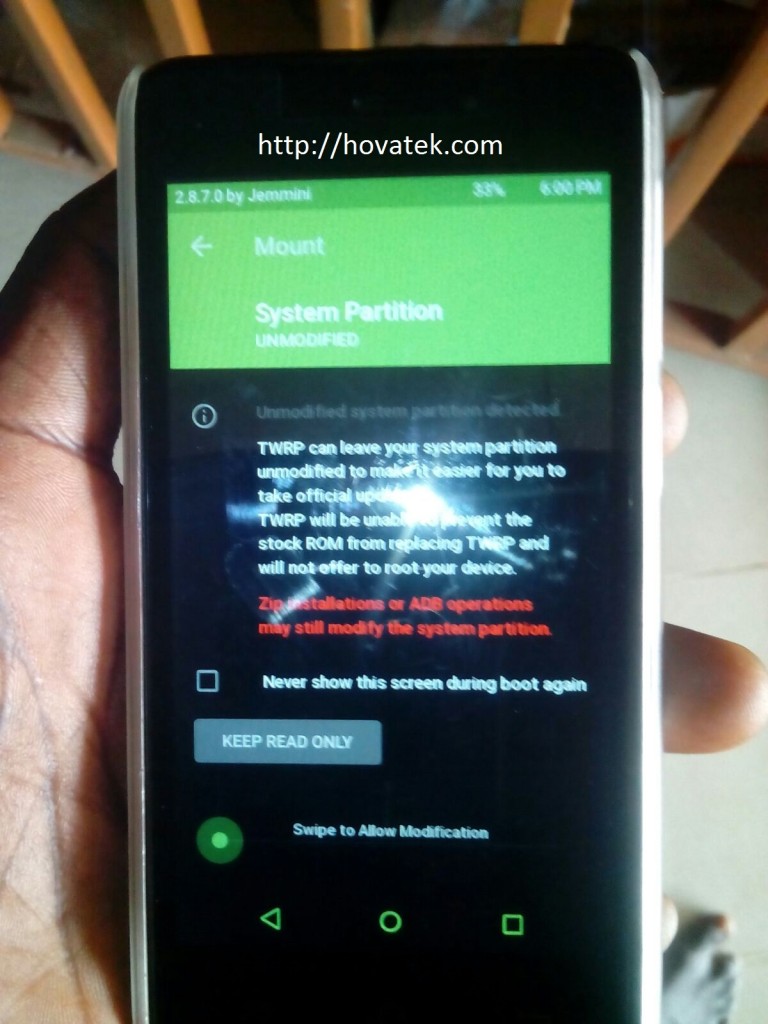
- If you get a message (in TWRP) like in the image below then swipe to allow TWRP modify the system partition
- To swipe, place your finger on the green circle then slide to the right
- In TWRP / CWM recovery, tap Install
- Navigate to the location of the SuperSU zip file you downloaded and select it
- Swipe or Select Yes to confirm flashing
- Reboot the phone once flashing is complete
- Install Root Checker to verify that the phone is rooted
List of TWRP / CWM recovery images for Lollipop Mediatek phones ported by Team Hovatek
* If your phone is not listed then request by posting a comment below
- CWM for Cubot P11: https://hovatek.com/redirect.php?link=https://docs.google.com/uc?id=0B9srKhKuVIMncms4djg1WHJLaWQ0S003MkVGbnQydmdld2tv&export=download
- CWM for Gionee Elife S Plus: https://hovatek.com/redirect.php?link=https://docs.google.com/uc?id=0B9srKhKuVIMnOEZ2cW03Y01XeURxSG1HNmc0NDQwdnNFMWI0&export=download
- CWM for Gionee Pioneer P5W: https://hovatek.com/redirect.php?link=https://docs.google.com/uc?id=0B9srKhKuVIMnVDFSVENxUkdYdEh6OGJaQmE0eG1ySGR5dDRZ&export=download
- TWRP for Innjoo Max 2 3G: https://hovatek.com/redirect.php?link=https://docs.google.com/uc?id=0B9srKhKuVIMnQnc4VlRyWTVSXzA&export=download
- TWRP for Innjoo Max 2 Plus 3G: https://hovatek.com/redirect.php?link=https://docs.google.com/uc?id=0B9srKhKuVIMnTHJCYlVXWTFrR1k&export=download
- TWRP for Old Tecno C8: https://hovatek.com/redirect.php?link=https://docs.google.com/uc?id=0B9srKhKuVIMncDRvUXFRNUN4YkR3cDFwVXdnZTBYYXVBYWJv&export=download
- TWRP for New Tecno C8: https://hovatek.com/redirect.php?link=https://docs.google.com/uc?id=0B9srKhKuVIMnRnBBYUdSRVVVZjg&export=download
- TWRP for Tecno J5: https://hovatek.com/redirect.php?link=https://docs.google.com/uc?id=0B9srKhKuVIMnUVNoeklxVmotTzc4czlja1lPVDZSNDlsQUpn&export=download
- TWRP for Tecno J8: https://hovatek.com/redirect.php?link=https://docs.google.com/uc?id=0B_-waNKLvNRcbUdEMkJKZkRGVkk&export=download
- TWRP for Tecno C5: https://hovatek.com/redirect.php?link=https://docs.google.com/uc?id=0B9srKhKuVIMnWXJpUTNNNnJnZDQ&export=download
- TWRP for Tecno L5: https://hovatek.com/redirect.php?link=https://docs.google.com/uc?id=0B9srKhKuVIMnTEp2Q0RZTkU4T1k&export=download
- TWRP for Tecno Phantom 5: https://hovatek.com/redirect.php?link=https://docs.google.com/uc?id=0B9srKhKuVIMnNV84WlRoSHd0ZkU&export=download
- TWRP for Infinix Note 2 X600: https://hovatek.com/redirect.php?link=https://docs.google.com/uc?id=0B9srKhKuVIMnVnVFdVZaQ3ZXbXRxaUNZRW1Pa3M4OFdiUnRF&export=download
- TWRP for Gionee P2M / M2 Mini: https://hovatek.com/redirect.php?link=https://docs.google.com/uc?id=0B9srKhKuVIMnTFlZRVF6UmNDek0&export=download
- TWRP for Gionee M5: https://hovatek.com/redirect.php?link=https://docs.google.com/uc?id=0B9srKhKuVIMnWmE2dW1rTFY3LXRUUlVRVUEyZWtXaUVjSlo4&export=download
- TWRP for Gionee M3 Mini: https://hovatek.com/redirect.php?link=https://docs.google.com/uc?id=0B9srKhKuVIMnTnZVMExfX3BkMVZ5clJKYlZSTlhTMTV0NVJv&export=download
Hovatek….just a button away!
I have d stock recovery and scatter file for the Doogee f5
Zip and send them to support@hovatek.com along with the phone model and your whatsapp number
Acer iconia a811: MTK – 4.1
Doogee F5: MTK – 5.1
This post is dedicated to Lollipop. Do you have the stock recovery and scatter file for the Doogee?
TWRP for lolli 5.1…
What phone model?
Never mind bro already downloaded it from your site..thanks a million…I downloaded the super su for infinix 510/5.1…but it din work for marshmallow 6.0….am i to download the su for marsh again? Or they are same?
You’re too download supersu for Marshmallow. It’s different from the one used for Lollipop.
You can download it at https://www.hovatek.com/blog/how-to-root-and-unroot-an-infinix-hot-2-x510-running-on-android-6-marshmallow/
Acer iconia a811
Doogee F5
What’s the chipset and Android version?
pls… help with alcatel onetouch popstar.
1. What’s the chipset
2. what’s the version of Android
MTK. ANDROID 5.1
do you have the stock recovery.img and scatter file?
How do i go about that?
Go about what?
Please help me port twrp for wiko slide 2
Have you sent us the recovery image and scatter file?
Please infinixi hot note is not there
Do you mean the Lollipop version?
hi
please give updates for my gionee m2 (rom 8gb) phone ,recently i updated my my mobile from jellybean to kitkat, now my mobile i am using kitkat verison, please give update for my Gionee M2 i will be very greatfull to you Sir.
with Regard’s
Parakala Srinivasa Reddy
Custom ROM for Asus zenphone6
Hello hovatek
please port TWRP for Tecno Droidpad 8H
We’re already on it,just need testers
Please let me test this for you
what’t your phone model?
Mine is the NuVision TM800A740M running android 7.0.
Root using Magisk @ https://forum.hovatek.com/thread-21427.html
Samsung Galaxy S5 Neo
Mediatek only