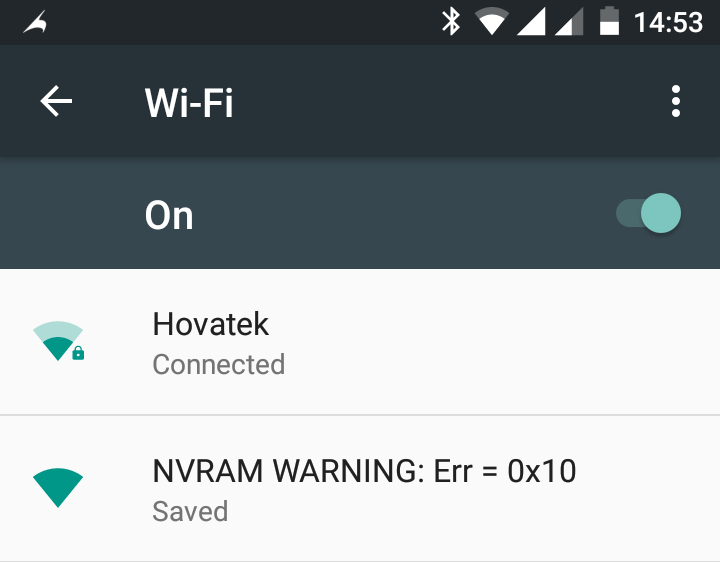
For those faced with the Wi-Fi NVRAM err 0x10, it really is nothing to worry about. Everything will work fine except this error message under Settings > Wi-Fi. We already dropped a guide on this at https://www.hovatek.com/forum/thread-117.html but this fix doesn’t seem to work for Infinix Hot 2 X510 users running on Android 6 (Marshmallow) so we’re dropping this guide for you guys.
How do I remove the NVRAM Warning Err 0x10 on my Infinix Hot 2 X510?
- Setup VCOM drivers on your PC using https://www.hovatek.com/forum/thread-440.html
- Download TWRP recovery, modified Lk.bin and Preloader.bin at https://hovatek.com/redirect.php?link=https://docs.google.com/uc?id=0B9srKhKuVIMnTy1qczlTYlkwbnc&export=download and flash them to the phone using SP flash tool at https://www.hovatek.com/forum/thread-159.html
- Download the TWRP backup of boot, secro and nvram for Infinix Hot 2 X510 at https://hovatek.com/redirect.php?link=https://docs.google.com/uc?id=0B9srKhKuVIMnMVVSS1l6WjBkSlk&export=download
- Unzip the TWRP backup and copy the TWRP folder directly to the Internal storage (do not copy into any folder)
- Boot the phone into recovery mode (see https://www.hovatek.com/forum/thread-479.html)
- If prompted to allow TWRP modify the /system partition then Swipe
- If TWRP offers to root for you, select No
- In TWRP, tap Restore
- Select 2016-02-09–22-55-39_X510-D5110-M-Androidone-20160107
- Swipe to begin restore
- Reboot the phone after restore then go check Wi-Fi, the error should have disappeared
Hovatek….just a button away!
My infinix hot 2 still hangs/crashes and doesn’t boot into recovery even with this… Please help
This guide isn’t supposed to fix a hanging or crashing Hot 2. You’ll need to flash the firmware
NVRAM fixed… but the fone is still going off and hanging… please help me out
what phone model? X510?
No, tecno h6 is d model
Did you flash the firmware?
Sure, av flashed with d firmware I download from hovatek
Have you tried a full twrp backup of the working H6?
Nope
Try that
Okay tnx
let me know how it goes
I’ve done dat, is that all?
You’re to flash twrp to both phones.
Boot into twrp on the working phone and backup secro and nvram then restore to the faulty one
No, but can get it…
let me know once you have it
I’ve gotten another H6, Pls tell me d procedure.
Is the phone rooted? If not, root using https://forum.hovatek.com/thread-1.html
After rooting, download https://drive.google.com/file/d/0B5MzHt8KX-5ySzVPdlVPeFN1cnM/view
Waiting
Done… what next
flash the recovery image you downloaded to the phone using rashr apk or flashify
My tecno h6 is giving nvram error, and it always trip off wen working, am guessing it’s the nvram issue, I’ve flashed it like 3 times now, Pls I need ur help.
do you have access to another working H6?
Noah James said it “fixed” his 3G-only, was wondering what that meant but now I do.
If you do not have 3G-only issues, DO NOT USE THIS FIX. The issue is that when you switch your network to “3G Only” or even “3G/2G” the network is never available – most times emergency mode (my case was everytime, I’m just trying to be fair). Once the network is 3G, it goes to emergency.
I didn’t have “3G Issues” but flashing this TWRP backup, removed the NVRAM issue but gave me the “3G Issue” as a thank-you-for-using prize. Nothing fixed it, flashing back my entire OS without removing user data didn’t work. The only fix was to “Format All + Download” – yes, format the entire device.
In my case it’s even more stressful, had to flash the Lollipop OS so I could change the IMEI to the original IMEI of the phone as the “Format All + Download” always resets my phone IMEI to an IMEI from God-knows-where.
I still have the NVRAM issue, will just ignore it as I have for months. I’m now restoring my phone apps/settings from Titanium Backup, just wanted to let you in on my ordeal.
Thank You
Thanks for the feedback. This fix works for both nvram and 3g only issues and doesn’t cause either to stop working. Yours might’ve been caused by a number of variables. Anyway, we’ll look into this.
I’m so grateful for this… You guys have been terrific. More blessings locate the problem solvers.
Amen. Don’t forget to share the post
This actually not only fixes the issues with nvram. It also fix the 3G only bug. It’s stable for me now. I’m so happy. Now I can enjoy my phone without network dropping at intervals.
Go to know. Don’t forget to share
Excellent as usual, will try it now.
Let’s know how it goes for you. We’ve had 2 successful tests
Ahmad
Ok