At some point or the other, your Android phone (and you) will have to leave the network reception stronghold and venture into an area of not so encouraging signal reception. In my previous guide on boosting the Internet connection speed on your Mediatek Android phone, I explained a life-saving technique that tells your MTK phone;
3G or 4G = Give me, EDGE or 2G = Keep it
See the guide at https://www.hovatek.com/blog/how-to-fix-3g-or-4g-constantly-dropping-to-2g-or-edge-on-an-mtk-android-phone/ if you missed it. In today’s tutorial, we shall be putting yet another device issue behind us, the problem of no service or reception when network mode is switched to WDCMA (3G) only.
Could you shed more light on this particular issue?
This problem borders around you being in an area with 3G coverage and having signal when your phone is set to 3G / 2G. The problem here is that when you set the phone to 3G / 2G, you get the slow 2G reception most of the time and switching to 3G only gives you no reception.
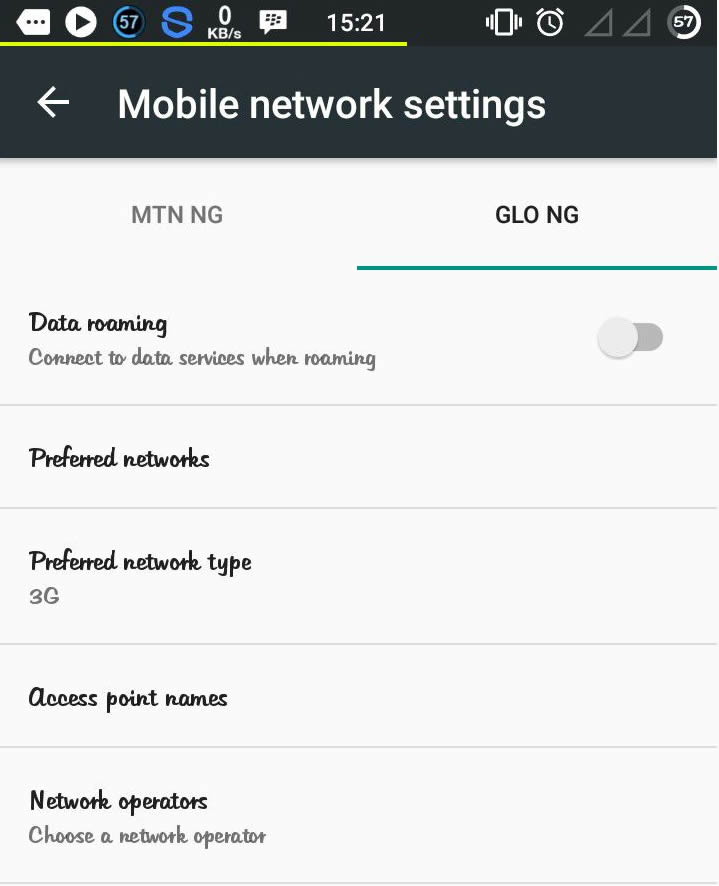
How do I change my preferred network type (between 3G and 2G)?
There are 2 methods:
-
Settings Menu
: Navigate to Settings > More > Mobile Networks > Select your Service Provider > Preferred Network type
-
Engineering Mode
: Install MTK Engineering Mode > Launch the app > Select MTK Settings > Tap Network Selecting (Under the Telephony tab)
How do I fix no service or reception while in WCDMA or 3G only mode?
Ideally, downloading the firmware at https://www.hovatek.com/forum/forum-89.html and flashing it (especially secro.img) using SP flash tool @ https://www.hovatek.com/forum/thread-159.html ought to fix the issue. Also, using SN Writer @ https://www.hovatek.com/forum/thread-12306.html to write IMEI could help. If these don’t resolve it then:
- You’ll need to get a working phone of the same model which is not having the issue
- Flash TWRP recovery to both phones (Use SP flash tool if not rooted and Rashr.apk if rooted)
- Boot the working phone into TWRP recovery (see https://www.hovatek.com/forum/thread-479.html) and backup the system, secro and nvram partitions
- Move the TWRP (backup) folder from the internal storage of the working phone to that of the phone having the 3G issue
- Boot the affected phone into TWRP recovery
- Restore the backup and reboot the phone
Note:
This fix also works for the WiFi NVRAM WARNING Err = 0x10 and the NVRAM WARNING Err = 0x02 errors
I have tried the TWRP method but the issue persists. What can I do?
Try the NVRAM Restore Method at https://www.hovatek.com/forum/thread-116.html


Good day Mr Hovatek. I’m having network issue with tecno j7. The sim 1 and sim 2 is not always bringing network together, it’s only one sim that brings network when network mode is set to 3G but if it’s on 2G, it won’t. Please what’s the solution for it, if you have ever across such situation or problem on tecno J7
You need to rewrite the phone’s IMEI using SN Writer @ https://forum.hovatek.com/thread-12306.html
You can Get the AP & BPL DB files @ https://forum.hovatek.com/thread-19361.html
I’m having the same problem with a Doogee X7 Pro (MTK6737m processor). The cell phone is still not working. I wrote imei, wifi mac, bandbase is ok, and the phone has no network signal. The solution is a backup of the nvram folder, but I can not find it anywhere. It can be any nvram of a device with MTK6737. Can someone help me?
Have you tried a factory reset under Settings > Backup & reset?
Instalei várias stock ROMs e custom ROMs. Resetar nunca tentei.
Please in serious need of assistance, having the issue but in my Samsung galaxy Core prime. Won’t bring out service when wcdma only. Help please
Is it original or cloned?
hi hovatek, I’m currently using a BLU STUDIO G. 3g works well in Chicago, now I’m in Africa….3g just went off…
Any solution please?
have you checked your APN settings to be sure its configured right?
Please hovatek can I get an Nvram backup for infinix x506? No one around me uses this phone.
Post this issue @ https://forum.hovatek.com
We’ll be happy to help
Pls hovatek….may Allah continue to bless you and your family,i dont av any body beside me dats using gionee p5w….my phone wont bring network when on 3G only….pls and pls….wat best solution do you have for me….cos der is no gionee p5w to do any backup….Thanks
you’ll need to search online for someone with the phone willing to send you an NVRAM backup
pls i saw dis on a website dat to download a cmprtible nviram.tar backup for all mtk device nd dat i jes av to change imei after flashin…pls can i use dat nvram?
The nvram backup is specific to each device
Post your request at https://forum.hovatek.com/thread-13992.html
but i have solve it nw with another method
Which method?
i download the nvram backup from mega and i restore it with mtk droid tools and restart the phone it works perfectly
It’s still the same method then
okay then but the twrp method does work for me i even backup d system file plus the nvram partition and restore it but didnt work
it doest work for me am using infinix x551
did you backup the NVRAM and Secro from a working phone in TWRP?
yes
3g only doesnt work
Can you get a working phone of the same model without this issue?
Am using techno j5
Cant find any friends with this phone
What’s wrong with your phone?