At some point or the other, your Android phone (and you) will have to leave the network reception stronghold and venture into an area of not so encouraging signal reception. In my previous guide on boosting the Internet connection speed on your Mediatek Android phone, I explained a life-saving technique that tells your MTK phone;
3G or 4G = Give me, EDGE or 2G = Keep it
See the guide at https://www.hovatek.com/blog/how-to-fix-3g-or-4g-constantly-dropping-to-2g-or-edge-on-an-mtk-android-phone/ if you missed it. In today’s tutorial, we shall be putting yet another device issue behind us, the problem of no service or reception when network mode is switched to WDCMA (3G) only.
Could you shed more light on this particular issue?
This problem borders around you being in an area with 3G coverage and having signal when your phone is set to 3G / 2G. The problem here is that when you set the phone to 3G / 2G, you get the slow 2G reception most of the time and switching to 3G only gives you no reception.
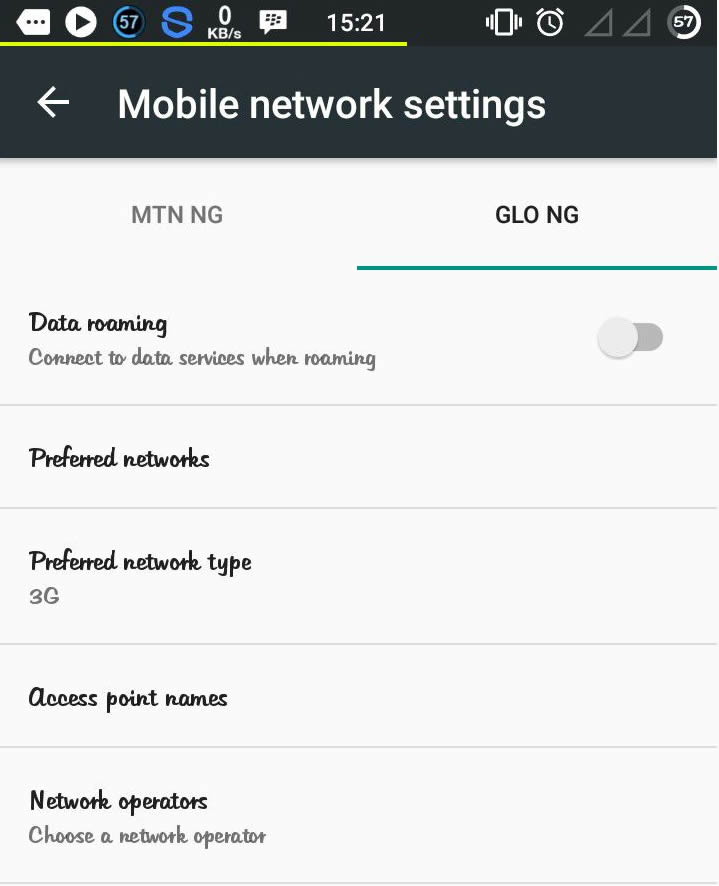
How do I change my preferred network type (between 3G and 2G)?
There are 2 methods:
-
Settings Menu
: Navigate to Settings > More > Mobile Networks > Select your Service Provider > Preferred Network type
-
Engineering Mode
: Install MTK Engineering Mode > Launch the app > Select MTK Settings > Tap Network Selecting (Under the Telephony tab)
How do I fix no service or reception while in WCDMA or 3G only mode?
Ideally, downloading the firmware at https://www.hovatek.com/forum/forum-89.html and flashing it (especially secro.img) using SP flash tool @ https://www.hovatek.com/forum/thread-159.html ought to fix the issue. Also, using SN Writer @ https://www.hovatek.com/forum/thread-12306.html to write IMEI could help. If these don’t resolve it then:
- You’ll need to get a working phone of the same model which is not having the issue
- Flash TWRP recovery to both phones (Use SP flash tool if not rooted and Rashr.apk if rooted)
- Boot the working phone into TWRP recovery (see https://www.hovatek.com/forum/thread-479.html) and backup the system, secro and nvram partitions
- Move the TWRP (backup) folder from the internal storage of the working phone to that of the phone having the 3G issue
- Boot the affected phone into TWRP recovery
- Restore the backup and reboot the phone
Note:
This fix also works for the WiFi NVRAM WARNING Err = 0x10 and the NVRAM WARNING Err = 0x02 errors
I have tried the TWRP method but the issue persists. What can I do?
Try the NVRAM Restore Method at https://www.hovatek.com/forum/thread-116.html


SN writer
Ok. Can you get access to a Hot 2 without this issue?
I wrote the imei only successfully buh still the prob. persist..
What method did you use?
so, with 3g only problem …what am i writing?
everything?
Yes, the backup fixes both
No pls…tell me
See https://forum.hovatek.com/thread-12306.html
HOVATEK pls do u have the backup file which are not having that problem for techno j5…
We’ve not had such a complaint. Have you followed our SN write tool guide?
please sir, please upload nvram from your handphone to me. I am user infinix note 2
For Note 2, you can use SN write tool.
First. Download the firmware @ https://forum.hovatek.com/thread-533.html
Any hope for me yet ? Gionee P2
Try SN Writer @ https://forum.hovatek.com/thread-12306.html
sir. I restore nvarm and system of mobile phone my friends who are not exposed to problems.But still has not shown up 3G / 4G network on my phone. how to think about the solution?whether its troubled ic PA?
It’s not an IC issue. What’s the phone model?
I do not see the option secro.img in twrp. nvram and system only choice when going backup system. where is it?
Backup only nvram then
oke sir
Can i make use of CTr recovery ? I’m asking because my phone doesn’t have support for twrp. It is a gionee p2
You best TWRP unless you can backup NVRAM and Secro in CTR
Thanks for the quick reply but sir can you upload the twrp backup of those files for me? I’ll really appreciate it sir because no body currently uses gionee pioneer p2 around. Even if it’ll cost me sir. thanks
Please sir can you help me upload the TRWP backup of those files?? I looked for a gionee p2 around and couldn’t find anyone using it.
Also, no luck with twrp rrecovery iimg for gionee p2. Please help sir
We dont have access to the phone
okay. please keep a watch out for me please.
No problem
I’m so very grateful for this. A lot of people have been suffering this thing just like me too. I’ve tried a lot but to no avail. Can I get a twrp backup at least? Thanks i will really appreciate it.
What’s your phone model?
Infinix hot 2… 2G ram version..
You’ll need to get a working Hot 2 to make a TWRP backup then
Actually you stated it. The problem is getting someone who’s willing to let me use his phone. That’s why I’m actually placing a kind request. Nonetheless I really do appreciate your kind assistance. God bless you.
We’ll see what we can do about that
Can i make use of CTr recovery ? I’m asking because my phone doesn’t have support for twrp. It is a gionee p2