Samsung Galaxy A12 Anonymity Experiment — Part 1: Getting Root Access
This post is the first part of a larger experiment I have been planning with my Samsung Galaxy A12: how anonymous can I make an Android phone when I have full control over the device?
My eventual goal is to investigate how much of the phone’s observable identity I can change or reduce. That includes things such as device properties, Android identifiers, location, network identity, browser and application fingerprinting, Google and Samsung services, permissions, telemetry and other signals that applications or websites may use to recognize a device.
Before attempting any of that, however, I decided that I wanted root access.
ADB already gives me a lot of control over an Android phone, but some of the experiments I have in mind will require access beyond what normal ADB and Android settings provide. Root access would give me a much better laboratory for inspecting and modifying parts of Android that are normally protected.
So this article became Part 1 of the anonymity experiment: rooting the Samsung Galaxy A12.
The phone I used was a Samsung Galaxy A12 SM-A125F running Android 12 on bootloader/binary revision 5. I expected the normal Samsung Magisk procedure to be fairly straightforward: download the matching firmware, patch the AP file, flash it with Odin and verify root.
That is not what happened.
The experiment eventually involved a successful Magisk AP patch, an Odin flash that returned PASS but left the phone bootlooping, a complete stock-firmware recovery, an exact-build third-party boot root package that Odin rejected, and a TWRP package whose recovery image was rejected as well.
Instead of hiding those failed attempts, I decided to document them because they revealed some important differences in how this Galaxy A12 handles modified firmware.
About this series: The aim of this project is not to claim that an Android phone can be made perfectly anonymous. I want to test, one layer at a time, which identifiers and signals I can actually control and which ones remain visible. Every conclusion in the series will be based on what I can reproduce on this Galaxy A12.
Important: Rooting and flashing Samsung firmware can wipe the phone, trip Knox permanently, cause bootloops and require a complete stock-firmware restore. I am using this Galaxy A12 as a lab device and backed up anything I wanted to keep before continuing.
1. Identifying the Exact Galaxy A12 Firmware
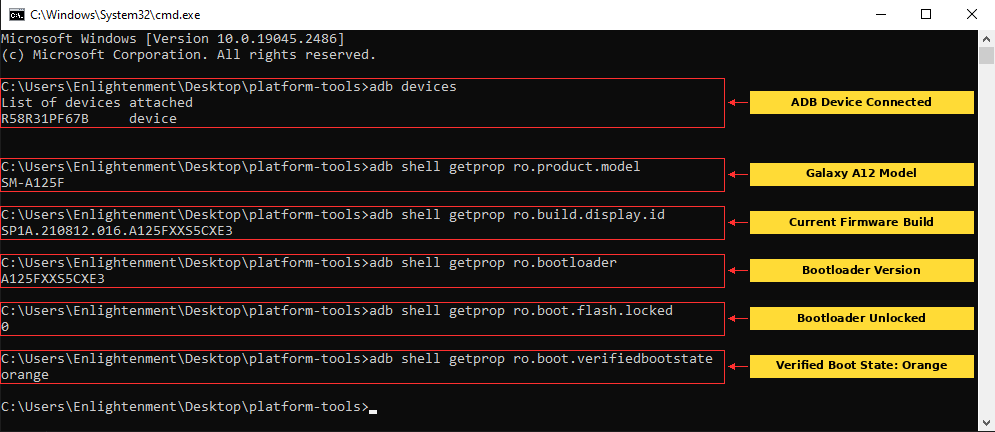
I started by confirming the exact model, Android build and bootloader version over ADB.
adb devices
adb shell getprop ro.product.model
adb shell getprop ro.build.display.id
adb shell getprop ro.bootloader
adb shell getprop ro.boot.flash.locked
adb shell getprop ro.boot.verifiedbootstate
The phone reported:
Model: SM-A125F
Build: SP1A.210812.016.A125FXXS5CXE3
Bootloader: A125FXXS5CXE3
ro.boot.flash.locked: 0
ro.boot.verifiedbootstate: orange
The 5 in A125FXXS5CXE3 was important because this phone was on Samsung binary / bootloader revision 5.
2. Confirming the CSC and Region
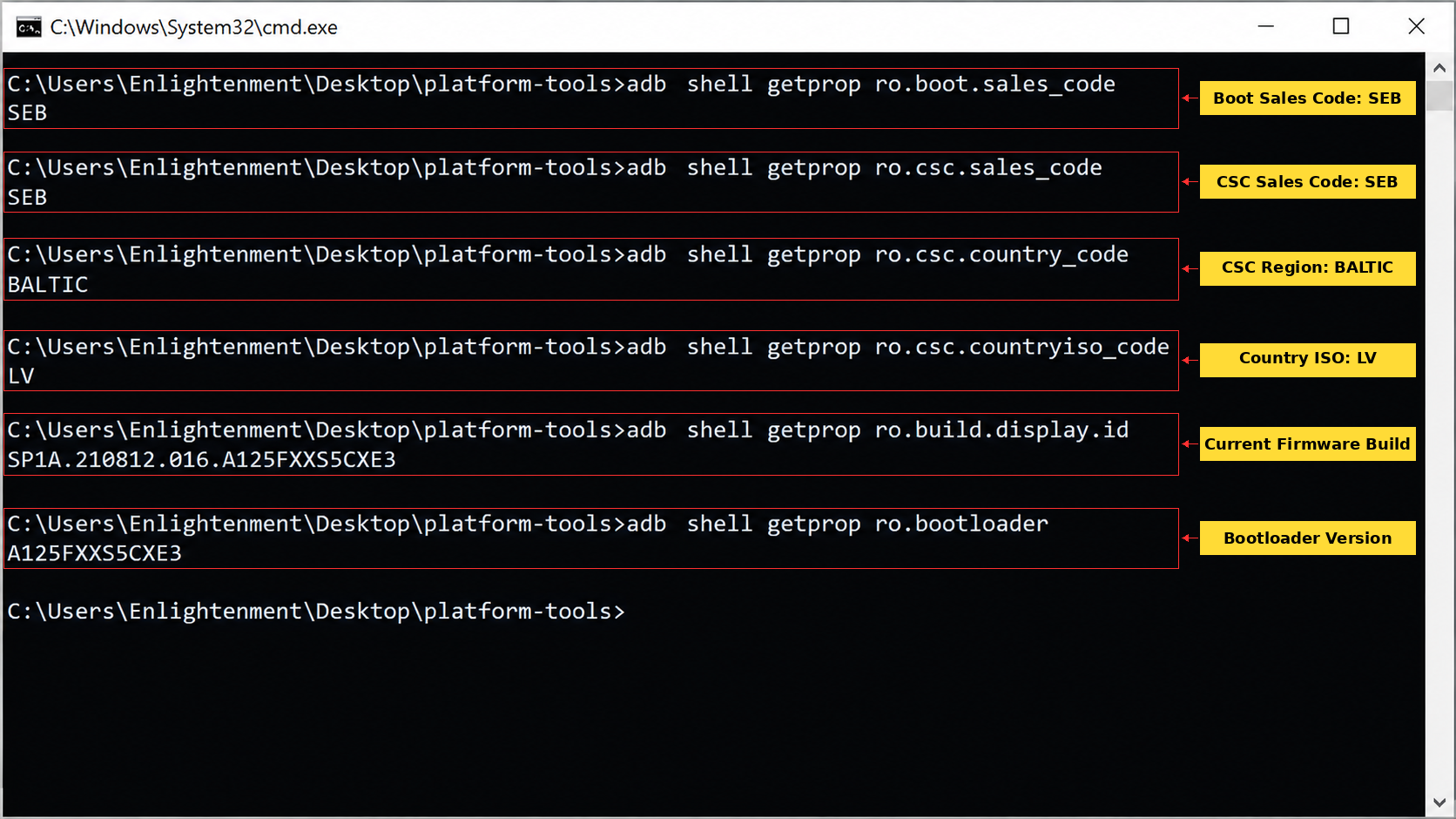
Before downloading firmware, I checked the Samsung CSC information so that I could match the phone as closely as possible.
adb shell getprop ro.boot.sales_code
adb shell getprop ro.csc.sales_code
adb shell getprop ro.csc.country_code
adb shell getprop ro.csc.countryiso_code
adb shell getprop ro.build.display.id
adb shell getprop ro.bootloader
The results were:
ro.boot.sales_code: SEB
ro.csc.sales_code: SEB
ro.csc.country_code: BALTIC
ro.csc.countryiso_code: LV
Build: SP1A.210812.016.A125FXXS5CXE3
Bootloader: A125FXXS5CXE3
That gave me a clear firmware target: SM-A125F, CSC SEB, Android 12, binary 5 and build A125FXXS5CXE3.
3. Confirming That the Bootloader Was Already Unlocked
The ADB results strongly suggested that the bootloader was already unlocked, but later checks made this even clearer.
adb shell getprop ro.boot.flash.locked
adb shell getprop ro.boot.verifiedbootstate
adb shell getprop ro.boot.vbmeta.device_state
The phone returned:
0
orange
unlocked
Download Mode later gave the strongest confirmation with:
OEM LOCK: OFF (U)So I did not need to repeat the Samsung bootloader-unlock procedure.
4. Downloading the Exact Stock Firmware
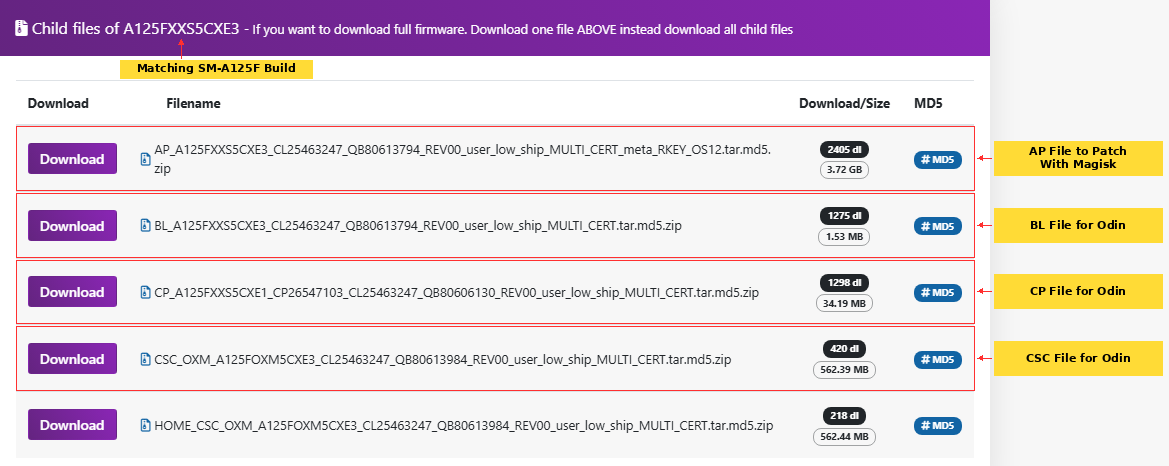
I downloaded the exact matching SM-A125F / SEB / A125FXXS5CXE3 firmware package.
The firmware set contained the normal Samsung Odin files:
AP_A125FXXS5CXE3_....tar.md5
BL_A125FXXS5CXE3_....tar.md5
CP_A125FXXS5CXE1_....tar.md5
CSC_OXM_A125FOXM5CXE3_....tar.md5
HOME_CSC_OXM_A125FOXM5CXE3_....tar.md5
The AP file was by far the largest of the firmware files and was the file I would later patch with Magisk.
5. Extracting AP, BL, CP and CSC
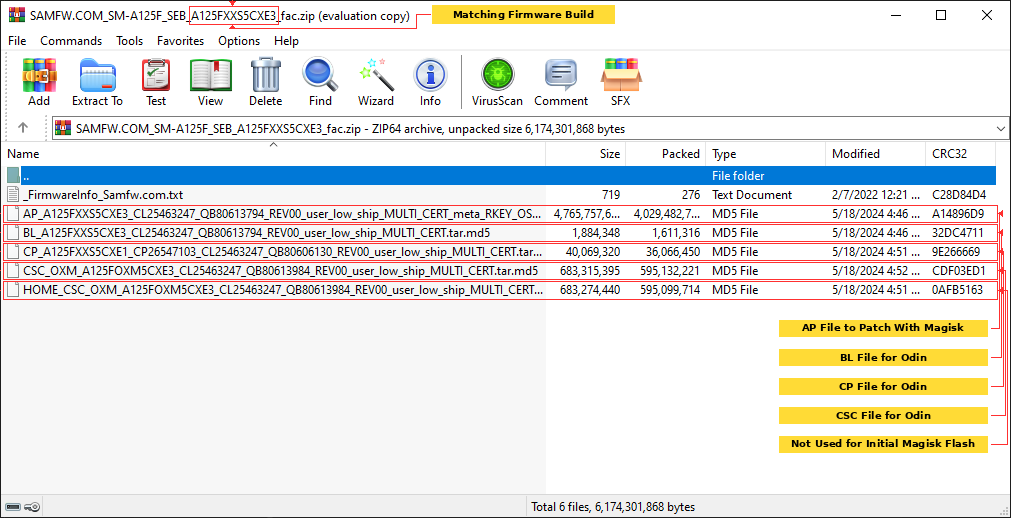
After the firmware download completed, I extracted the archive to a folder on the Windows desktop.
I kept the original AP, BL, CP and CSC files untouched because I knew I might need them later if the root attempt failed.
6. Installing Magisk and Checking Ramdisk Support
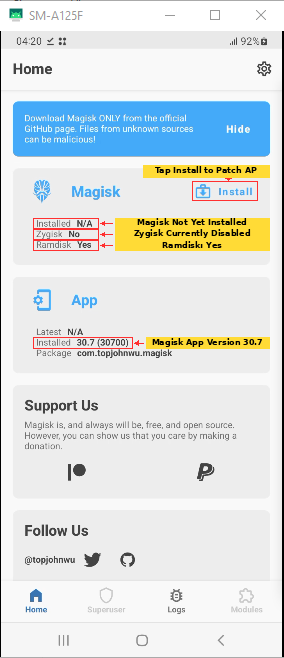
I installed Magisk 30.7 on the Galaxy A12 and opened its home screen before patching anything.
Magisk reported:
Installed: N/A
Zygisk: No
Ramdisk: Yes
App: 30.7 (30700)
The important value was Ramdisk: Yes. I therefore did not enable Magisk’s Recovery Mode option when patching the AP firmware.
7. Copying the Stock AP Firmware to the Phone With ADB
Rather than transferring the multi-gigabyte AP file through MTP, I used ADB.
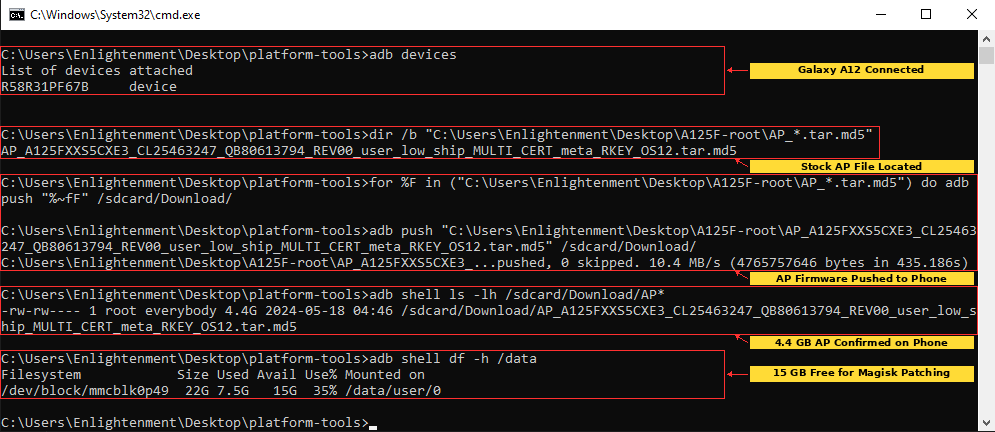
I first confirmed the AP filename on the PC:
dir /b "C:\Users\Enlightenment\Desktop\A125F-root\AP_*.tar.md5"Then I pushed it to the phone’s Download folder:
for %F in ("C:\Users\Enlightenment\Desktop\A125F-root\AP_*.tar.md5") do adb push "%~fF" /sdcard/Download/ADB reported a successful transfer of 4765757646 bytes.
I verified the file on the phone:
adb shell ls -lh /sdcard/Download/AP*The AP appeared as approximately 4.4G.
Before patching, I also checked free internal storage:
adb shell df -h /dataThe phone had about 15G available, giving Magisk enough room to create another large firmware archive.
8. Patching the Samsung AP File With Magisk
Inside Magisk, I selected:
Install
Select and Patch a File
Downloads
AP_A125FXXS5CXE3_....tar.md5
LET'S GO
Magisk unpacked the AP archive, processed the images inside it and repacked the result.
The operation completed with:
All done!Magisk created:
/storage/emulated/0/Download/magisk_patched-30700_7AO2R.tar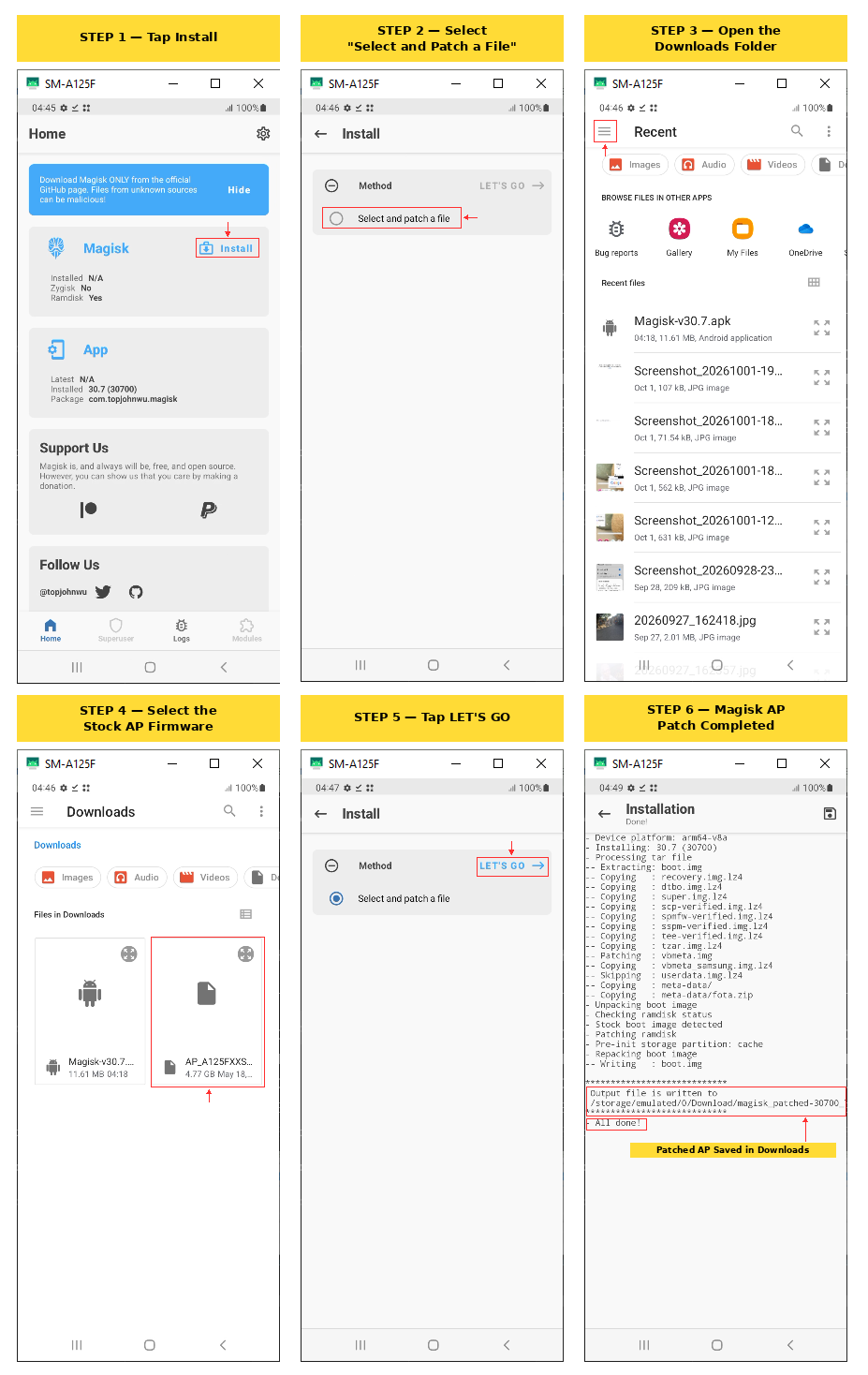
9. Pulling the Magisk-Patched AP Back to the PC
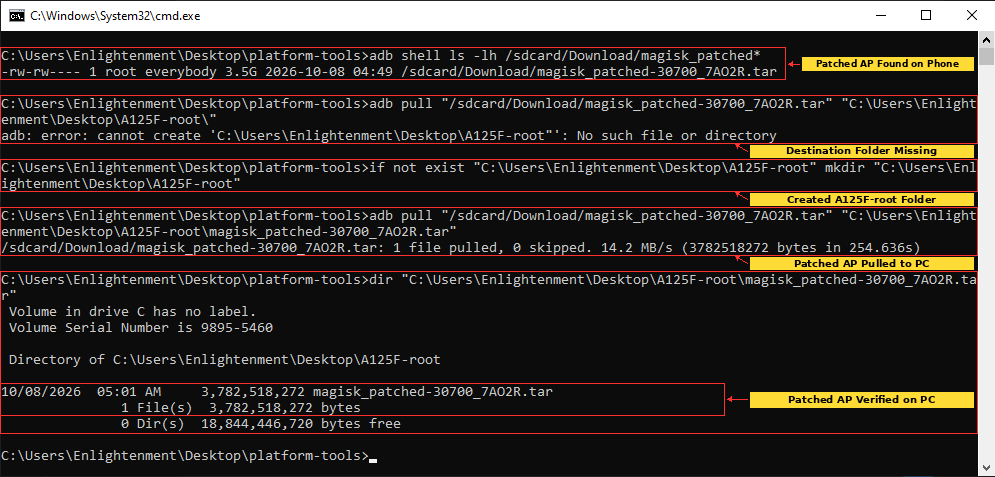
I verified the patched file first:
adb shell ls -lh /sdcard/Download/magisk_patched*The result showed:
magisk_patched-30700_7AO2R.tar
3.5G
My first pull attempt failed because the destination folder did not exist, so I created the folder and tried again:
if not exist "C:\Users\Enlightenment\Desktop\A125F-root" mkdir "C:\Users\Enlightenment\Desktop\A125F-root"

adb pull "/sdcard/Download/magisk_patched-30700_7AO2R.tar" "C:\Users\Enlightenment\Desktop\A125F-root\magisk_patched-30700_7AO2R.tar"
The successful transfer reported:
1 file pulled, 0 skipped
3782518272 bytes
A final dir check confirmed the patched AP on the PC at 3,782,518,272 bytes.
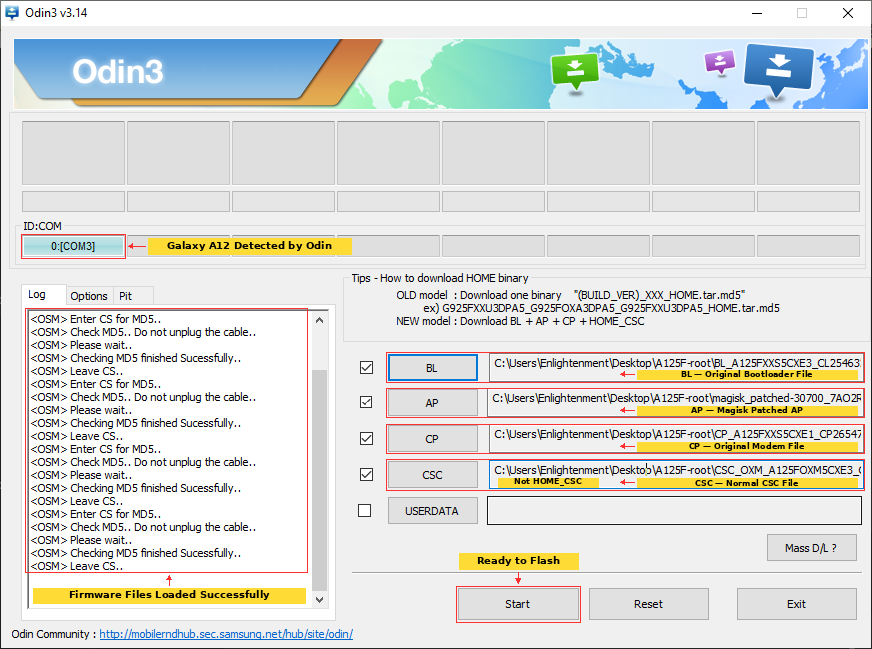
10. Preparing Odin With the Patched AP
For the first root attempt, I loaded Odin with the matching stock files and the Magisk-patched AP:
BL  - original BL_A125FXXS5CXE3_....tar.md5
AP  - magisk_patched-30700_7AO2R.tar
CP  - original CP_A125FXXS5CXE1_....tar.md5
CSC - original CSC_OXM_A125FOXM5CXE3_....tar.md5
I used the normal CSC rather than HOME_CSC for this initial Magisk installation.
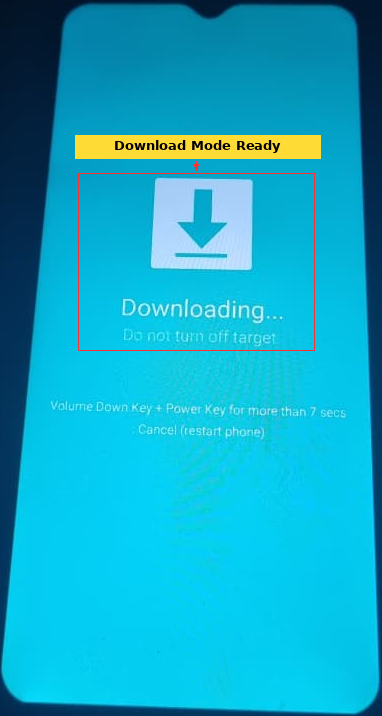
Odin detected the phone on a COM port and accepted all four files.
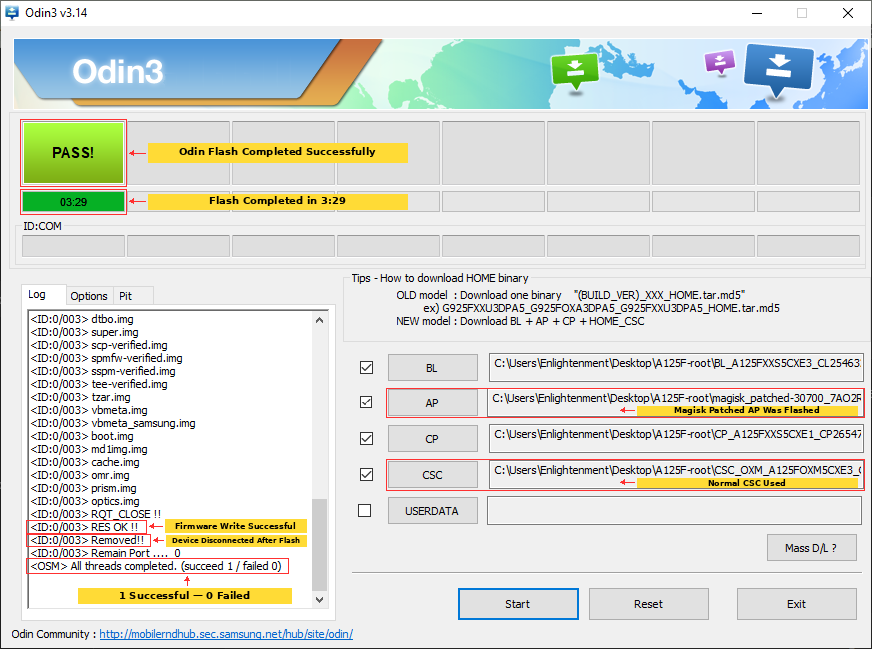
11. Odin Successfully Flashed the Magisk-Patched AP
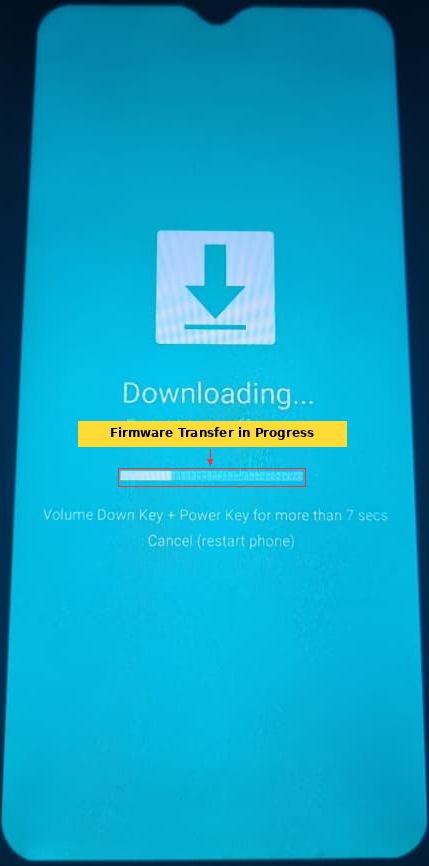
I started the Odin flash and watched it write the firmware partitions.
The Odin log showed entries including:
Firmware update start..
NAND Write Start!!
boot.img
vbmeta.img
recovery.img
dtbo.img
super.img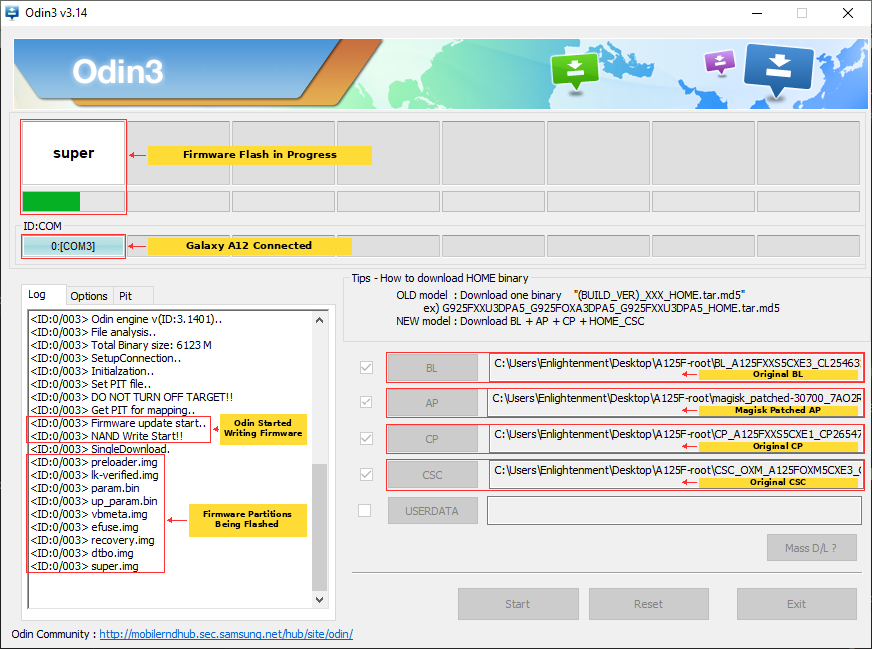
Odin eventually displayed a large green:
PASS!The final log also showed:
RES OK !!
Removed!!
All threads completed. (succeed 1 / failed 0)
At this point, the flashing stage itself looked completely successful.
12. The Phone Bootlooped After Odin PASS
The successful Odin result did not mean the phone could actually boot the modified firmware.
After the flash, the Galaxy A12 entered a bootloop instead of completing the Android first boot.
I initially tried to enter Recovery so that I could perform the expected factory reset, but Recovery was not opening reliably from the bootloop.
This was the first major lesson from the experiment: Odin PASS only proved that Odin and the phone accepted the flash operation. It did not prove that Android would successfully boot afterward.
13. What Download Mode Revealed After the Bootloop
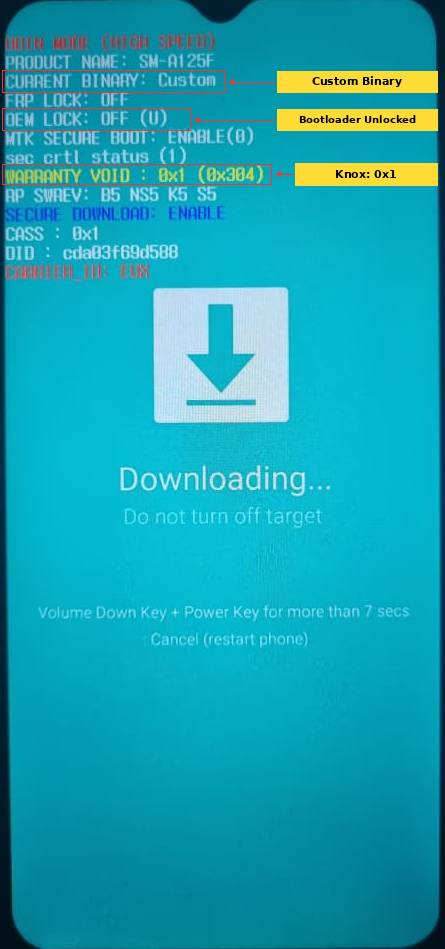
I returned to Samsung Download Mode and finally got a screen containing detailed device information.
The important lines included:
PRODUCT NAME: SM-A125F
CURRENT BINARY: Custom
FRP LOCK: OFF
OEM LOCK: OFF (U)
WARRANTY VOID: 0x1
RP SWREV: B5 ...
SECURE DOWNLOAD: ENABLE
This confirmed several things at once.
- The bootloader was genuinely unlocked:
OEM LOCK: OFF (U). - The phone recognized that a custom binary had been flashed:
CURRENT BINARY: Custom. - Knox had been tripped:
WARRANTY VOID: 0x1. - The phone was still on binary 5.
14. Restoring the Original Stock Firmware
Because the Magisk-patched AP bootlooped, I restored the exact stock firmware with Odin.
This time I used only the original firmware files:
BL  - original BL
AP  - original stock AP
CP  - original CP
CSC - original CSC
The phone returned to Android normally and reached the home screen.
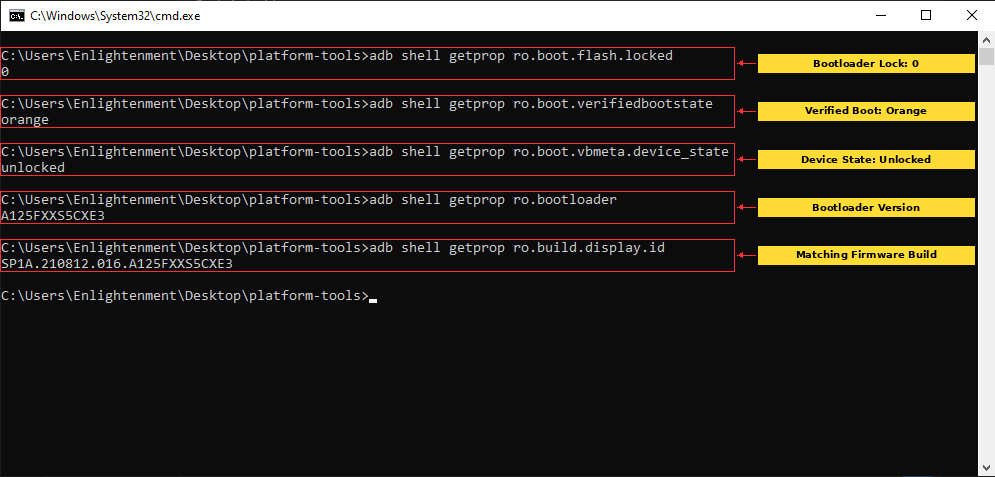
I then checked whether restoring stock firmware had relocked the bootloader:
adb shell getprop ro.boot.flash.locked
adb shell getprop ro.boot.verifiedbootstate
adb shell getprop ro.boot.vbmeta.device_state
adb shell getprop ro.bootloader
adb shell getprop ro.build.display.id
The important results were still:
ro.boot.flash.locked = 0
ro.boot.verifiedbootstate = orange
ro.boot.vbmeta.device_state = unlocked

Bootloader: A125FXXS5CXE3
Build: SP1A.210812.016.A125FXXS5CXE3
So restoring stock firmware repaired the bootloop without relocking the bootloader.
15. Testing an Exact-Build Third-Party Boot Root Package
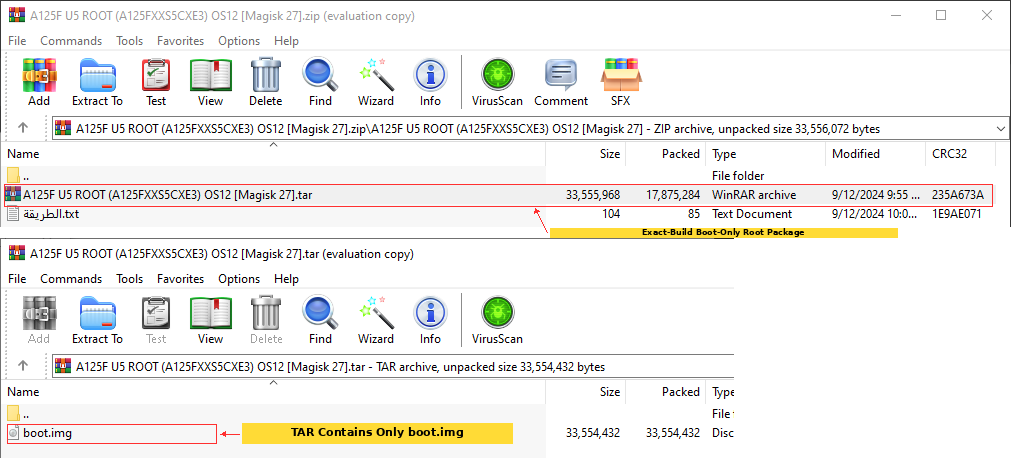
Since the full Magisk-patched AP had bootlooped, I tested a third-party package built specifically for the same firmware:
A125F U5 ROOT (A125FXXS5CXE3) OS12 [Magisk 27]I opened the package before flashing it. The TAR contained only:
boot.imgThis was very different from the full AP method. It was designed as a boot-only root flash.
The package also included a short Arabic instruction file indicating that the root file should be flashed and the phone formatted afterward.
16. Odin Rejected the Modified boot.img
I loaded the third-party root TAR into Odin’s AP slot by itself.
BL   - empty
AP   - A125F U5 ROOT (A125FXXS5CXE3) OS12 [Magisk 27].tar
CP   - empty
CSC  - empty
For this attempt I disabled Auto Reboot and kept only F. Reset Time enabled.
This time Odin did not reach PASS.
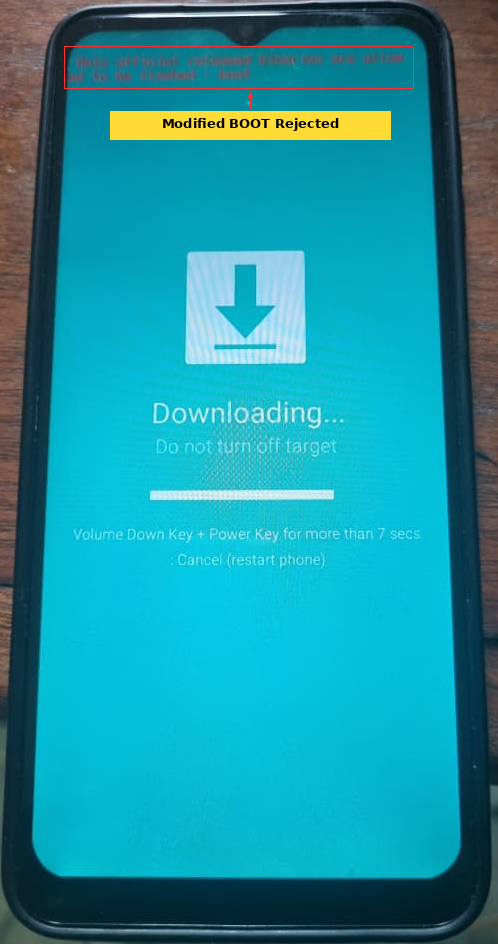
The phone displayed:
Only official released binaries are allowed to be flashed (BOOT)Odin’s log showed:
Firmware update start..
NAND Write Start!!
SingleDownload.
boot.img
RQT_CLOSE !!
Complete(Write) operation failed.
All threads completed. (succeed 0 / failed 1)
The modified standalone boot image was therefore rejected before the flash could complete.
After exiting Download Mode, the phone still booted normally into Android.
17. Testing the Exact-Build ROOT+TWRP Package
I then downloaded another package for the same exact build:
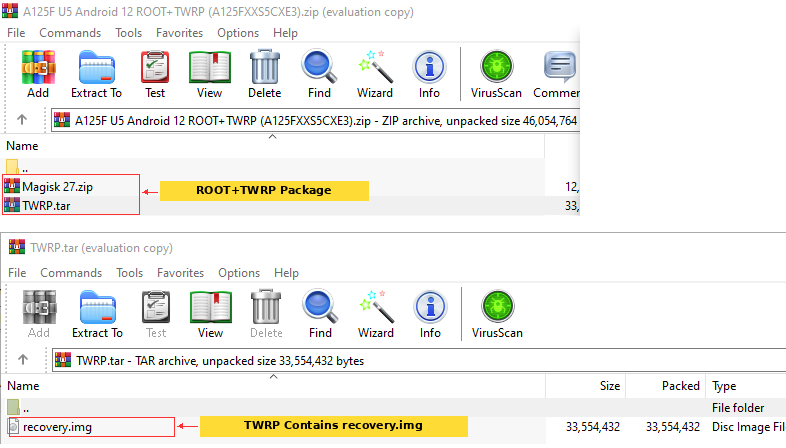
A125F U5 Android 12 ROOT+TWRP (A125FXXS5CXE3)Inside it were:
Magisk 27.zip
TWRP.tar
I opened TWRP.tar and found that it contained only:
recovery.imgThe intended approach therefore appeared to be: flash TWRP, boot directly into custom recovery and then install Magisk from recovery.
18. Odin Rejected recovery.img Too
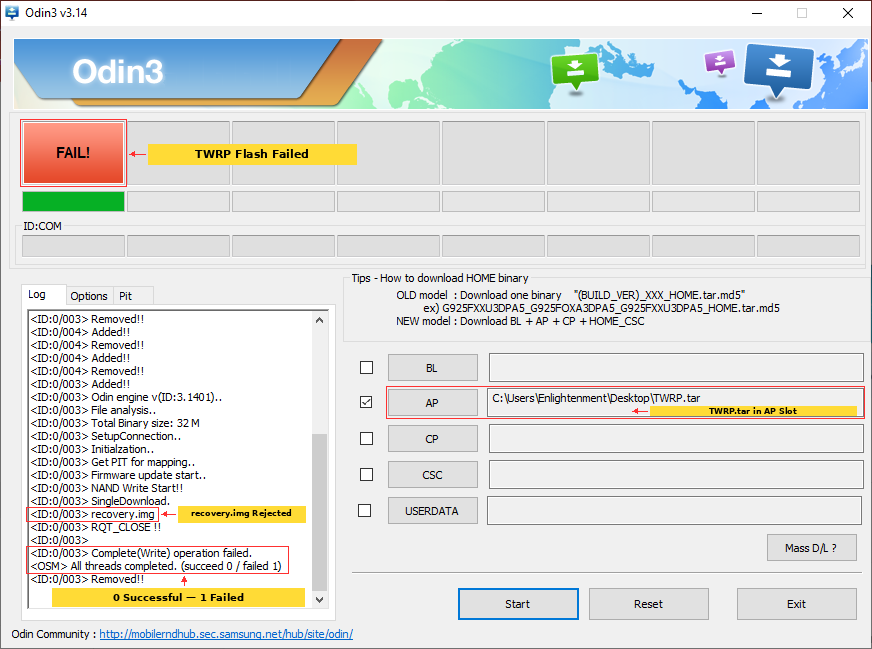
I loaded TWRP.tar into Odin’s AP slot and attempted the recovery-only flash.
Odin again failed during the partition write.
NAND Write Start!!
SingleDownload.
recovery.img
RQT_CLOSE !!
Complete(Write) operation failed.
All threads completed. (succeed 0 / failed 1)
So the standalone modified recovery image was rejected just as the standalone modified boot image had been.
19. What I Learned From the Rooting Attempts
Although I had started this experiment because I wanted root access for the larger anonymity project, the most interesting result from this first stage was that the three custom-image attempts did not fail in the same way.
Full Magisk-patched AP
→ Odin accepted the flash
→ PASS
→ Android bootlooped

Third-party boot.img TAR
→ Odin attempted boot.img
→ phone rejected it
→ FAIL

Third-party TWRP recovery.img TAR
→ Odin attempted recovery.img
→ write failed
→ FAIL
This distinction matters.
The Galaxy A12 was not simply refusing every modified file. The complete Magisk-patched AP was accepted and written by Odin, while the standalone modified BOOT and RECOVERY images were rejected during the write itself.
The full AP attempt also changed the phone’s state enough for Download Mode to report CURRENT BINARY: Custom, while Knox changed to WARRANTY VOID: 0x1. Even so, the modified system could not complete Android boot.
The stock firmware package proved to be one of the most important things I prepared before starting. Returning to the exact A125FXXS5CXE3 firmware restored the phone to a normal booting Android system after the Magisk bootloop.
I also confirmed that restoring the stock firmware did not relock the bootloader. ADB continued to report:
ro.boot.flash.locked = 0
ro.boot.verifiedbootstate = orange
ro.boot.vbmeta.device_state = unlocked
That is useful for the rest of this series because it means I still have an unlocked test device and can continue investigating other rooting approaches without starting the bootloader-unlock process again.
20. Why Root Matters for the Anonymity Experiment
Rooting is not the actual objective of this project. It is infrastructure for what I want to test afterward.
Once I have reliable root access, I want to investigate the phone’s identity layer by layer instead of relying on privacy claims or assumptions.
Some of the areas I plan to examine include:
- Android and application identifiers
- device model and system properties exposed to applications
- build and software fingerprint information
- advertising and application-level identifiers
- location and location-related services
- Wi-Fi and Bluetooth behavior
- public IP, DNS, IPv6 and other network information
- browser and WebView fingerprinting
- timezone, language, locale and screen characteristics
- Google and Samsung background services
- permissions, analytics and telemetry
- what remains identifiable even after obvious identifiers are changed
The important part will be verification. If I change an identifier, I want to test whether applications or websites actually see the new value rather than simply assuming that a modification worked.
I also do not intend to describe the final phone as completely anonymous. A device can potentially be recognized through combinations of network behavior, accounts, software characteristics and other signals even when obvious identifiers have been changed.
The real question for this series is therefore: how much linkability can I actually remove from this Galaxy A12, and what information remains exposed when I am finished?
21. Where the Rooting Investigation Stands Now
At the end of this first round of testing, I have not yet achieved stable root, so I am not presenting this article as a successful Galaxy A12 rooting guide.
What I have established is much more specific:
- The phone is an unlocked
SM-A125Fon Android 12, binary 5 and buildA125FXXS5CXE3. - The exact stock firmware can be flashed successfully and reliably restores the phone.
- Magisk 30.7 successfully patches the full Samsung AP archive.
- Odin accepts that complete patched AP and reports
PASS. - The resulting system enters a bootloop.
- An exact-build third-party standalone
boot.imgis rejected during the Odin write. - An exact-build standalone TWRP
recovery.imgis also rejected during the Odin write. - Restoring the stock firmware does not relock the bootloader.
The problem is therefore no longer simply finding firmware, unlocking the bootloader or learning how to use Odin. Those parts are already understood.
The next rooting question is much narrower: what is different about the full Magisk-patched AP that allows Odin to accept it, and why does that accepted firmware fail to boot while standalone modified BOOT and RECOVERY images are rejected outright?
I will continue investigating that before moving fully into the identity and anonymity experiments.
Conclusion
This was supposed to be the setup stage for a much larger Android anonymity experiment. Before attempting to change how the Galaxy A12 identifies itself to applications, websites and networks, I wanted reliable root access so that I could inspect and control more of the operating system.
The root attempt turned into an investigation of its own.
The first Magisk approach got further than the later standalone-image attempts: Odin successfully flashed the complete patched AP and returned PASS, but Android entered a bootloop. By contrast, the exact-build boot-only and TWRP packages were rejected during the partition write itself.
Most importantly, the exact A125FXXS5CXE3 stock firmware repeatedly returned the phone to a working state, and the bootloader remained unlocked afterward. That means the Galaxy A12 is still a usable test platform rather than a dead end.
This is therefore only the beginning of the series.
Once I establish a stable root method, the next stage will be to record the phone’s baseline identity and begin testing how much of it can actually be changed, hidden or made less useful for fingerprinting.
The eventual goal is not to say, “I turned on a few privacy settings, therefore the phone is anonymous.” I want to measure what changes, what does not change and what still gives the device away.