[Tutorial] How to Fix Windows Defender Blocked by Group Policy Error
[Tutorial] How to Fix Windows Defender Blocked by Group Policy Error

15-02-2017, 10:08 AM
This guide will show how to fix "Windows defender block by group policy. If you get this error message when trying to run Windows Defender, simply follow the procedures below to fix this.
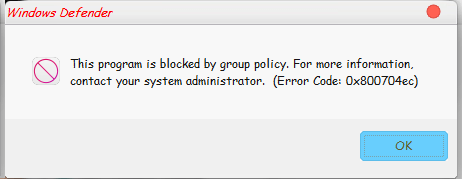
How to Fix Windows Defender Blocked by Group Policy Error
Follow the steps below to fix windows defender blocked by group policy
- Press Win + R on your keyboard
- In the Run window that opens next, Type "regedit" then click on Enter

- Now the regedit window should open, navigate to
Code:HKEY_LOCAL_MACHINE\SOFTWARE\Policies\Microsoft\Windows Defender\
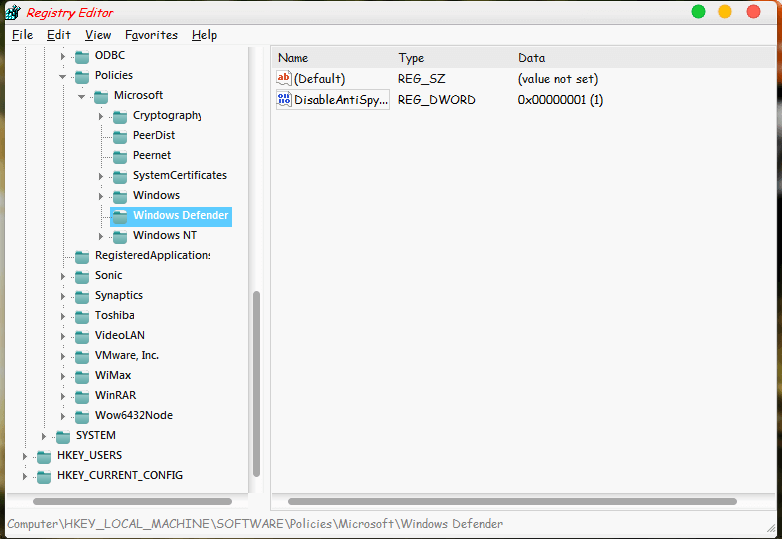
- On the right side pane, right click on "DisableAntiSpyware" then click on Modify

- In the small window that opens next, change the value data from 1 to 0 then click on OK

- Now, you can run Windows Defender

This post was last modified: 02-07-2018, 10:30 PM by X3non.
Learn MediaTek, Unisoc / Spreadtrum (SPD) and Qualcomm Software Repairs @ https://www.hovatek.com/training
Note!
We have a reply schedule for Forum Support. Please try Private Support if you can't wait.
Users browsing this thread:
1 Guest(s)
1 Guest(s)
Users browsing this thread:
1 Guest(s)
1 Guest(s)


