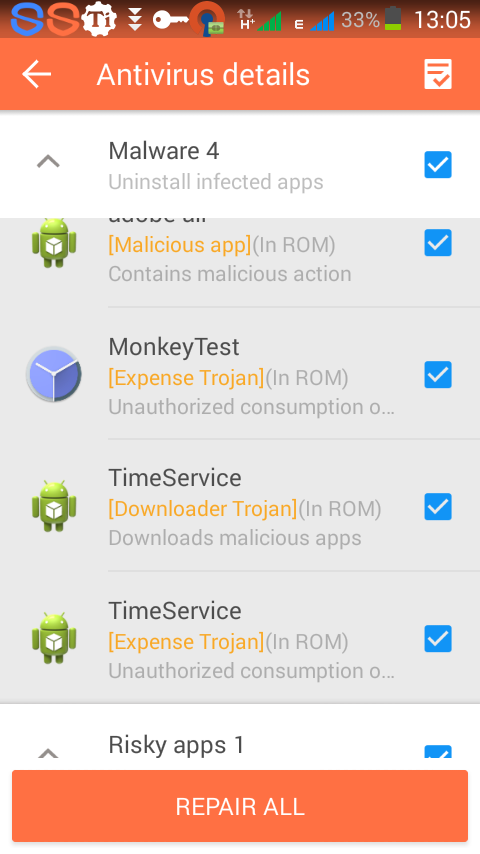
Quite a number of fans have complained about encountering this issue either on other peoples MTK Android phones or theirs so we’ll be discussing these malware, how they affect your Android phone and how to permanently remove them.
How did I get infected?
In my previous article on removing Malware from an Android phone (see https://www.hovatek.com/blog/how-to-remove-adware-from-an-android-phone/), I discussed some methods by which malware infect your Android phone. The easiest point of entry for an Android phone is the application(s) you install. Considering how popular the Android platform is and how many Android apps there are, its not hard to imagine why hackers would exploit this. The most potent carriers of malware are cracked / nulled apps (using malware crypters and binders).
Are they harmful to my Android phone?
If you’ve ever experienced these apps then you would know that they not only auto-update but also install unsolicited applications on your phone (using up your data plan). Adware are just a few steps away from harvesting your personal information so why wouldn’t they go all the way? You will also get a lot of has stopped errors like “unfortunately adobe air has stopped”, “unfortunately measure has stopped” and this could be very frustrating.
Why wont uninstalling / factory resetting remove them?
Uninstalling them under Settings >Apps or doing a factory reset would have been effective if only these apps were fully installed in the /data partition. After uninstalling, all you need to do is reboot your phone and they’re back again like nothing happened.
How then do I remove privacy guard, easy tool, monkey test and time service from my phone?
Consider the following methods:
1. Locate the malicious apks under /system/apps, data/app, vendor/operator/app , system/priv-app, system/preloadapp or anywhere they’re installed to and delete them. For Monkey Test and Time Service, the apks to delete are cameraupdate.apk, providerCertificate.apk, providerdown.apk and themeManags.apk (see https://www.hovatek.com/blog/how-to-remove-bloatware-on-an-android-phone/ for the Bloatware removal techniques ). The phone needs to be rooted in order to use this method (see https://www.hovatek.com/blog/how-to-root-android-easily-without-pc/ to know more about rooting an Android phone)
2. Install a good antivirus like 360 security , Stopbadapp , AVG , Ghost Push Trojan Killer, Avast or Malwarebytes and scan the phone.
3. Use the custom recovery backup and restore method:
- Get a working phone of the same model (without the malware issue)
- Flash a custom recovery to both phones using the method at https://www.hovatek.com/forum/thread-455.html and backup the working phone in recovery mode (see https://www.hovatek.com/forum/thread-479.html for how to boot into recovery mode)
- Copy the backup folder from the SD card of the working phone to the SD card of the malware infected phone (ensure to maintain the folder structure)
- Boot the malware infected phone into recovery mode and format System under Mounts & Storage
- Return to the main menu and restore the backup of the working phone under Backup & Restore > Restore
4. Format then flash using SP Flash Tool
- Get a clean working phone of the same model and back it up using the method described at https://www.hovatek.com/forum/thread-468.html (you’ll then have a stock / MTK backup)
- Format then flash the malware infected phone using SP Flash Tool at https://www.hovatek.com/forum/thread-159.html and the stock MTK backup obtained from the step above
My phone is stuck at brand logo after deleting something wrong in the /system folder. How do I fix my phone?
You need to flash back system.img or system.ext4.tar depending on the format that your /system directory is in the ROM. Please, create a new thread at our forum and our reps will provide free step by step assistance (see https://www.hovatek.com/forum/thread-514.html for how to create a thread) .
Hovatek….just a button away!


H6-G325-B2-KK-20150707, is the one which will not work and so I should not bother download it?
You need the firmware for your build number
Hw about G325-20140923, which was flashed in? Nway it’s working but sometimes freezing
Does it freeze in safe mode?
What do you mean by safe mode
There’s a way to boot your phone into safe mode
Will that help? And how should I do that?
See https://forum.hovatek.com/thread-572.html
It’s no longer doing that since I changed the ROM, today I used a USB to read my H6, but was read as Tecno J7, why did that happen?
This happens a lot on Tecno phones. Phones use almost the same drivers and parts as other models
Last week I took it to a software engineer and gave me a firmware with a build number H6-G325-20140923 But seems to be an older version, with just a 2GB free space and sometimes freezing. Which variant is that.?
Nway, I have found a certain firmware with a build number of H6-G325-B2-KK-20150707,Is it safe if I download that? Remember the original number is H6-G325-A2-KK-20150122S.
Then lastly, is there any problem if the IMEI change after flashing?
The second firmware isn’t for your variant, it might not work properly.
For the IMEI, there’s no problem
For how long should I wait, and how many variants are there for H6?
There are up to 4, possibly more.
Can’t give an exact estimate for when it’ll get uploaded but usually within a week
H6-G325-A2-KK-20150122S
Yours is variant 3. We’ll upload the firmware soon
I have tried many anti viruses including AVG, 360 security,, they could help me to identify them, also directed me to disable and force stop the infected inbuilt apps, lastly I downloaded stubborn Trojan killer which requested me to download king root of which I did and I rooted the phone. On rooting, I was able to uninstall the inbuilt apps completely, King root then changed into a system app, yesterday I restored the phone but king root reappeared as a system app. But all in all, on doing all that, it only stopped downloading the malicious software but it couldn’t save quick data loss and so I had to disable all back ground data of all apps including Google play Store, and this made my phone very slow and some features not working.
Ok.
Go to Settings > About > Build number and tell me what you have there
Any flashing system like the VOLCANO TOOL can work?. Also I’m seeing H6 variant 1 and H6 variant 2 which one should I download. My H6 is of the second version of an 8GB ROM with a 5GB free space.
Before considering flashing, had you already tried the antivirus method?
An original
Then you should have no problem with our firmware
Some time back I visited a software stores to flash but he told me that I had to get another physical H6 phone so he can copy the file to mine, and he continued that if he uses a downloaded file from Internet, that my phone may fail to power on a again. Is there no worry about this file? Thanks
Is your phone an original or a clone?
My Tecno H6 has been attacked by malicious app called “pro” this goes on downloading other apps like android patch, engrils, engriks and games like “through the gun fire” and others without notice. System apps like adobe air, measure, security plugin go on stopping and my data is used rapidly before I use it. They can’t be removed by a factory reset or flashing.
What can I do to over come the problem. Thanks
Just follow the guide above
There is no way I can get the stock ROM?
It’s at https://forum.hovatek.com/thread-311.html
Will it work if I download it directly with my H6 and install it?
And if it’s possible, can’t the file be lost if I perform a factory reset?
Last but not the least, can I upgrade my android version from 4.4 kitkat to 5.0 lollipop and how?
You can download the firmware with any device but need a PC to flash as the guide says.
No such upgrade for your phone
please I have some unwanted apps on my techno h7,still there even after factory reset and even erased my memory card.please help
What are the apps exactly?