S999 Bootloader unlock
S999 Bootloader unlock

26-03-2021, 11:02 AM
(25-03-2021, 09:56 AM)Actrapit Thank you very much for this Information, but it did not work.
I tried this several times and different Combos as you discribed.
Maybe the Manufacturer forgot to mount the missing Buttons or left them in their Factory for development, Hahahaha
I don´t give up! I will find a way.....
Maybe with Hex or something else i do not know about yet.
This Forum is very helpful and kind, thanks for that!
guess only the oem can help you with the right combo for unlocking bootloader
you could check your phone for ram cleaning apps or settings, either uninstall / disable the app or add your apps to the ram cleaning whitelist ; it should help with the force stopping of background apps
Learn MediaTek, Unisoc / Spreadtrum (SPD) and Qualcomm Software Repairs @ https://www.hovatek.com/training
Note!
We have a reply schedule for Forum Support. Please try Private Support if you can't wait.
26-03-2021, 11:30 AM
you could check your phone for ram cleaning apps or settings, either uninstall / disable the app or add your apps to the ram cleaning whitelist ; it should help with the force stopping of background apps
[/quote]
Yes i think the oem can do. But they wount help me with this, unfortunalty.....
Pretty shure a whitelist will help, but i dfo not have access to the cleaner. Its not visible in the App List.
The developer Options are partially accessible via tapping 7x on Firmware-Version.
Here i tried to adjust the Limit of Backround Actions from Standard to any possible Option - no luck at all.
Thanks for your very good advices!
Anyways i will try again!
Still did not loose hope.
Maybe i going to dismantle it and find the Pinout of the Socket where the Powerbutton is connected.
Its a 10pin socket and 4 are Ground and 2 are used for the PWR-Button, so lets go......
30-03-2021, 10:24 AM
i found the "BACK BUTTON"
But unfortunalty NO VOl. Buttons.
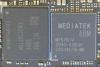
I asume they are directly wired to the MTK BGA and not pinned out pysicaly on the pcb elswhere, like the two other Buttons are.
This means:
NO Unlock with Fastboot.
If anybody has an unlocked BL for this Mashine or a Solution, please let me know.
Thank you!

01-04-2021, 10:11 PM
(30-03-2021, 10:24 AM)Actrapit So,
i found the "BACK BUTTON"
But unfortunalty NO VOl. Buttons.
I asume they are directly wired to the MTK BGA and not pinned out pysicaly on the pcb elswhere, like the two other Buttons are.
This means:
NO Unlock with Fastboot.
If anybody has an unlocked BL for this Mashine or a Solution, please let me know.
Thank you!
01-04-2021, 10:21 PM


PC keyboard equivalents to Android hard keys
Back Esc
Home Alt+Esc
Windows+Esc
Menu Context Menu key
Ctrl+Esc
Search hold Context Menu key
Windows+Space
Quick Launch [2] Windows key + <letter>
Volume multimedia keys
Additional shortcuts:
Alt+Tab — switch between recently-run apps
Ctrl+Alt+Del — forcible ungraceful reboot
The above lists only things specific to PC keyboards. Androids with a sliding keyboard already support a large number of native shortcuts, see there for more. (even if your phone doesn't have a sliding keyboard, Android OS still supports those key shortcuts)
(01-04-2021, 10:11 PM)faldore What about using a keyboard through USB will the up and down or volume buttons work?
(30-03-2021, 10:24 AM)Actrapit So,
i found the "BACK BUTTON"
But unfortunalty NO VOl. Buttons.
I asume they are directly wired to the MTK BGA and not pinned out pysicaly on the pcb elswhere, like the two other Buttons are.
This means:
NO Unlock with Fastboot.
If anybody has an unlocked BL for this Mashine or a Solution, please let me know.
Thank you!
01-04-2021, 10:51 PM
there are several identical watches.
LOKMAT APPLLP MAX S999
JingTider S999
BEESCLOVER S999
You can try contact all of them, and see if you can find method. You know the ROM developers know how to do it. I'm not sure what they would gain from hiding the information.
also what does this do??
https://play.google.com/store/apps/detai...n_US&gl=US
(01-04-2021, 10:11 PM)faldore What about using a keyboard through USB will the up and down or volume buttons work?
(30-03-2021, 10:24 AM)Actrapit So,
i found the "BACK BUTTON"
But unfortunalty NO VOl. Buttons.
I asume they are directly wired to the MTK BGA and not pinned out pysicaly on the pcb elswhere, like the two other Buttons are.
This means:
NO Unlock with Fastboot.
If anybody has an unlocked BL for this Mashine or a Solution, please let me know.
Thank you!
01-04-2021, 10:54 PM
If I can just get vanilla android on there, it would be perfect phone for me.
(01-04-2021, 10:51 PM)faldore Another interesting thing.
there are several identical watches.
LOKMAT APPLLP MAX S999
JingTider S999
BEESCLOVER S999
You can try contact all of them, and see if you can find method. You know the ROM developers know how to do it. I'm not sure what they would gain from hiding the information.
also what does this do??
https://play.google.com/store/apps/detai...n_US&gl=US
(01-04-2021, 10:11 PM)faldore What about using a keyboard through USB will the up and down or volume buttons work?
(30-03-2021, 10:24 AM)Actrapit So,
i found the "BACK BUTTON"
But unfortunalty NO VOl. Buttons.
I asume they are directly wired to the MTK BGA and not pinned out pysicaly on the pcb elswhere, like the two other Buttons are.
This means:
NO Unlock with Fastboot.
If anybody has an unlocked BL for this Mashine or a Solution, please let me know.
Thank you!
02-04-2021, 03:55 AM
Anyway, I uploaded dumped rom files from LOKMAT APPLLP MAX(a variation of S999) just in case. Dump/Write partitions is allowed even without bootloader unlock so maybe there is some possible trick. I'm really appreciate if someone can help this, or any hints given. Stock software on this device is just an disaster of the century and There are more problems which still not even mentioned in thread. We really need to unlock bootloader for daily use. Or root at least.
drive.google.com/file/d/1ULbQoXVlsnBufT-gZPCznmyhwgNlpiPW/view?usp=sharing
This post was last modified: 02-04-2021, 09:07 AM by Bikko.
02-04-2021, 09:53 PM
I did not check it while we are in FASTBOOT MODE. In this mode we are bevore Android OS comes Up.
If there is support for external Keyboard - I do not belive - But i will check to be sure.
Maybe you can do also and write it here down.
Also yes to you - i did an ROM dump by my self. Unfortunalty my coding skills and knowledge is much too poor to get success on this way.
I hoped to find someone to get pity of this and help some people like me.
There was a reason why people like to change the Rom on this watch and one of course is that threre are a lot a curios things like discribed happens. I did not try to contact other Sellers for some Reason.
Please read this:
https://discourse.fullandroidwatch.org/t...read/61383
from the FULLANDROIDWATCH Discourse.
I think Pablo is one of the good Guys out there and has no reason to lie!
This post was last modified: 06-04-2021, 08:40 PM by Actrapit.
Attached Files

02-08-2021, 08:54 PM
Users browsing this thread:
1 Guest(s)
1 Guest(s)
Users browsing this thread:
1 Guest(s)
1 Guest(s)


